
Capacity Requirement Planning (CRP): How to Forecast and Align Your Resources with Avaza
Engineering firms, IT services companies, and consulting agencies often hit the same wall:
- You win more projects,
- Your pipeline looks healthy,
- And then delivery starts wobbling because capacity planning lives in scattered spreadsheets or in one person’s head.
Some people are booked out for months, others sit idle, and nobody can confidently answer, “When can we start this new project?”
That’s exactly the problem Avaza is built to solve. When you plug tangible capacity requirement planning into a unified project, time tracking, and resource scheduling platform, your team finally sees whether you have enough of the right people, at the right time, to deliver what you’ve sold.
This guide walks through how to build a modern capacity requirement planning (CRP) process that works for project-based teams—and how to make it far easier by running your planning inside Avaza’s resource planning software.
What Is Capacity Requirement Planning (CRP) in Project-Based Work?
Capacity requirement planning (CRP) is the process of checking whether your available resources (people, time, skills, and tools) can meet the workload created by your current and upcoming projects over a defined period.
In other words, CRP answers one central question for project managers and operations leaders:
Do we have enough of the right people, at the right time, to deliver the work we’ve committed to?
To answer that question, CRP pulls together three main groups of information:
- The work you need to do,
- The people you have to do it,
- And the business rules around how those people are used.
In practice, that means combining demand from projects and tasks, your resource pool (roles, skills, working hours), and constraints like utilization targets and budgets into a single view of capacity vs. demand.
A simple way to think about the capacity requirement planning formula is:
Net capacity = Available capacity − Required capacity
- Available capacity is based on how many people you have, their working hours, and your utilization target, adjusted for holidays and leave.
- Required capacity is the total estimated effort across all projects, internal initiatives, and operational work in the same period.
If net capacity is positive, you have headroom to take on more work or accelerate delivery. If it’s negative, you’re overcommitted and need to adjust.
In Avaza, this isn’t a static calculation hidden in a spreadsheet. Your capacity plan is powered by real projects, tasks, and timesheets via project management and collaboration, online timesheets software, and project time tracking, so capacity numbers update as people log actual work.
Why Capacity Requirement Planning Matters for Engineering, IT Services, and Consulting Teams
If you sell expertise and time, capacity is your product. Misjudge it, and your whole business feels the impact.
For engineering and construction firms, CRP influences whether project milestones are realistic and whether specialized roles, such as structural engineers or solution architects, are available when design and construction phases hit.
For IT services and software consulting, capacity requirement planning determines how you juggle long-term managed services and short, fixed-scope implementation projects.
For strategy and business consulting, CRP helps you line up the right blend of partners, consultants, and analysts without burning them out.
Without a structured CRP process, some familiar patterns emerge:
- The same senior people are constantly “on fire” while juniors wait on the bench.
- Projects slip because the right skills aren’t free when the work is ready.
- Sales commits to aggressive start dates that delivery can’t realistically meet.
- Utilization and margins are unpredictable, making revenue harder to forecast.
By contrast, a disciplined CRP process inside Avaza creates transparency and control:
- Sales can see when there is real capacity to start a project, backed by data instead of gut feel.
- Delivery can see who is overloaded and rebalance workloads before burnout sets in.
- Finance gets better inputs for project cost tracking and profitability analysis.
- And leadership can plan hiring and growth using a live view of capacity, not just a hope-filled spreadsheet.
Avaza supports different industries with tailored workflows, from engineering project management and construction project management software to IT services and software consulting automation and business consulting software.
That means your CRP approach can reflect the reality of your projects, clients, and billing models.
How Avaza Turns Capacity Requirement Planning into a Live System
You can technically run CRP in spreadsheets, but the moment project dates shift, people go on leave, or priorities change, your model is out of date. Avaza connects capacity requirement planning directly to where work is planned, tracked, and billed, so the picture you see is always current.
Unified Project, Time, and Resource Planning
Avaza pulls work from projects, tasks, and milestones into a single capacity view through its project management and collaboration and project management tool with time tracking modules. You create projects, estimate tasks, and assign roles once; those estimates flow directly into your capacity plan.
As people log hours through online timesheets software or the Avaza time tracking apps, actuals feed back into your plan. That makes it easier to compare planned vs. actual effort, fine-tune estimates, and keep CRP grounded in reality.
Visual Scheduling and Workload Management
Avaza’s project resource scheduling view presents a visual timeline of everyone’s work across all projects. At a glance, you can see who is fully booked, who has room, and which projects are driving the most demand.
If you need more advanced views, Avaza’s workload management tools and workload management for teams capabilities make it easy to:
- Spot overloads before they turn into late nights and missed deadlines.
- Identify underutilized roles or locations that could take on more work.
- Rebalance allocations simply by dragging and dropping bookings.
Plan by Role, Skill, and Location
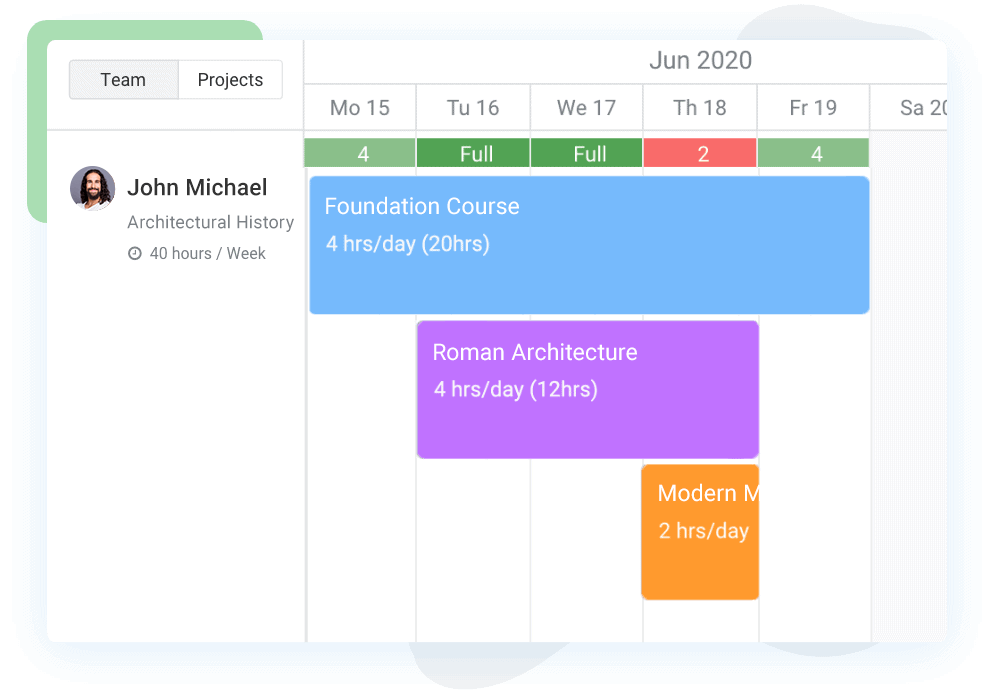
Early in planning, you often know the kind of person you need more than the exact individual. Avaza supports role-based and skill-based planning via resource planning and resource planning software.
You can book demand for “Senior Backend Engineer” or “UX Designer” in the schedule, then map those bookings to specific people later. Combined with resource utilization and insights into resource constraints, that makes it easier to answer questions like:
- Do we have enough mid-level developers in time zone X next quarter?
- Which design team can absorb this new campaign without burning out?
- If we add one more data analyst, how much additional work can we commit to?
Budget, Profitability, and Billing in the Same System
Capacity planning decisions are ultimately financial decisions. With Avaza, those decisions are tied directly to budgets, costs, and billing:
- Project budget management lets you set budget and time limits per project.
- Project cost tracking software reveals the cost side of capacity, including rates and expenses.
- Online invoicing software and features like recurring invoicing convert capacity into revenue.
- Reporting tools—backed by resources such as how to measure project profitability and billable vs non-billable hours, give leadership a clear line of sight from capacity decisions to margins.
Instead of planning capacity in one tool and checking profitability in another, Avaza keeps the whole picture in one place.
Integrations That Keep Capacity Data in Sync
Your capacity plan is only as accurate as the data that feeds it. Avaza connects with the tools your teams already use, via the Avaza app marketplace and integrations such as Jira, Slack, Google Sheets, Xero, and QuickBooks.

Automations with the Avaza Zapier integration let you sync data across systems, so your capacity requirement planning always reflects the most recent work and financials.
Capacity Requirement Planning Vs Capacity Planning Vs Resource Planning
Capacity requirement planning sits in a family of related concepts that often get blurred together. Understanding the differences helps you design the right planning rhythm.
- Capacity planning is strategic and long-range. It asks, “How much capacity should we have over the next 6–24 months?” Decisions include hiring, infrastructure, and long-term tool investments.
- Resource planning is operational and short-range. It focuses on how specific people or roles are allocated to active work, often week by week. Avaza’s project management resource allocation and resource planning software live here.
- Capacity requirement planning (CRP) is the tactical bridge between the two. It compares concrete upcoming work with your current near-term capacity and flags gaps before they become crises.
You can think of it like this:
Concept | Time Horizon | Key Question | Typical Owner |
Capacity planning | 6–24 months | How much capacity should we have overall? | Leadership / Finance |
Capacity requirement planning | 3–26 weeks | Can our current team meet the workload in this period? | Ops / PMO |
Resource planning & scheduling | 1–12 weeks (rolling) | Who is doing what, when, and do we need to reshuffle work? | Project / Resource Mgrs |
Avaza supports all three layers, from strategic portfolio views in the project dashboard to detailed allocations with best resource scheduling software.
Types of Capacity Requirement Planning Methods (and When to Use Them)
Different planning situations call for different CRP methods. Most mature teams combine several.
Top-Down CRP: Fast Portfolio-Level Planning
Top-down capacity requirement planning starts from high-level assumptions. For example, you might decide that a new implementation project requires three senior developers and one QA engineer for three months.
This method is ideal when:
- You’re evaluating a new deal in the pipeline.
- You don’t yet have detailed tasks but need a ballpark capacity estimate.
- Leadership wants to see how adding a new project affects the big picture.
In Avaza, you can model top-down CRP by creating high-level phases, assigning them to roles, and blocking out time in the project resource scheduling view even before the detailed work breakdown is finalized.
Bottom-Up CRP: Precise Execution Planning
Bottom-up CRP works from detailed tasks and milestones. You break work into phases; estimate effort at task level; assign tasks to roles or individuals; and roll everything up into project and portfolio views.
Bottom-up planning is most useful when you’re close to delivery and need a reliable workload forecast for the next few sprints or months.
Using frameworks like Avaza’s work breakdown structure and resource breakdown structure (RBS) helps you structure this detail in a way that’s easy to maintain.
Time-Based CRP: Capacity Vs Demand by Week or Month
Time-based CRP takes a fixed horizon, say, the next 12 weeks and compares capacity and demand for each period. The goal is to quickly see which weeks or months are over capacity and where you can move work to even things out.
Avaza’s workload management tools and best project scheduling software capabilities make this easy. You can zoom in on individuals or zoom out to see entire teams and projects in a single view.
Project-Based CRP: Focused on Programs and Key Accounts
Project-based CRP focuses on specific projects, programs, or clients. This is especially important for agencies and consultancies working with key accounts and SLAs.
With Avaza’s agency project management, marketing agency project management software, and creative digital marketing agencies solutions, you can group work by account or program and quickly see whether dedicated teams have enough capacity to fulfil their commitments.
Scenario-Based CRP: What-If Capacity Planning
Scenario-based CRP explores questions like:
- What if we accept this new project in the same quarter as the product launch?
- What if we delay Project A by four weeks to free up key specialists?
- What if we hire two mid-level developers instead of one senior architect?
In Avaza, you can clone projects, adjust dates, and create tentative assignments to simulate different scenarios. Combine that with insights from resource constraints and project management strategies, and you can choose the most sustainable and profitable option.
How to Calculate Capacity Requirements Step by Step
You don’t need advanced math to run capacity requirement planning. You need a clear set of steps and a system to keep them up to date.
Step 1 – Define Your Planning Horizon and Granularity
Decide how far ahead you want to look and at what level of detail:
- Fast-moving teams (e.g., agile software, digital agencies) often prefer a rolling 12–16 week view with weekly granularity.
- Longer projects (e.g., engineering, construction) may mix a detailed three-month view with a higher-level six- to twelve-month forecast.
In Avaza, this translates into the date range and zoom level you use in project resource scheduling and the project dashboard.
Step 2 – Estimate Workload and Effort
Translate demand into effort:
- List all active and upcoming projects in your planning horizon.
- Break each into phases, deliverables, or tasks.
- Assign each item to a role or skill set.
- Estimate effort in hours or days and map it to specific weeks or months.
Articles like how to estimate time for a project and calculating hours worked can help sharpen these estimates. Store them directly in Avaza tasks so your capacity plan is rooted in real work.
Step 3 – Calculate Available Capacity by Person and Role
Next, figure out how much capacity your team truly has:
Start with contracted hours for each person, subtract public holidays, planned leave, and non-billable overhead (internal projects, training, admin), and multiply by a realistic utilization target, not 100%, but what you expect in practice.
This gives you effective capacity per person per period. Group people by role, team, or location to see capacity at higher levels.
Avaza’s timesheet software for small business, resource utilization, and utilization reports help you compare these assumptions against how people are actually spending their time.
Step 4 – Compare Required Capacity to Available Capacity
Now compare required capacity (your estimates) to available capacity (your people and hours) by period and role:
- Where required capacity is comfortably below available capacity, you have headroom.
- Where it’s roughly equal, you’re running “hot” and should plan for slippage or risk.
- Where required capacity exceeds available capacity, you have a capacity shortfall.
In Avaza, this comparison is visual. Over-allocations are immediately visible in project resource scheduling, and workload management tools highlight where action is needed.
Step 5 – Decide How to Close Capacity Gaps
Finally, you decide how to respond to the gaps that CRP reveals. You might reallocate work between teams or locations, delay or rescope lower-priority projects, bring in contractors or partners, adjust start dates on new work, or hire new staff where recurring shortages appear.
This is where Avaza’s professional services automation software, project budget management, and project profitability reports come together to guide decisions. You’re not guessing, you’re weighing tradeoffs with data.
Spreadsheet CRP vs Capacity Requirement Planning Software (Avaza)
Many teams start CRP in spreadsheets because they’re quick to set up. But as you grow, their limitations become painful. Here’s how manual spreadsheets compare to using Avaza.
Aspect | Spreadsheets | Avaza Capacity Planning |
Data freshness | Manual, quickly out of date | Live data from projects, schedules, and timesheets |
Managing changes | Fragile formulas, version conflicts | Drag-and-drop resource scheduling with automatic recalculation |
Visibility by role/skill | Custom pivot tables and filters | Built-in role, skill, and team views in resource planning software |
Handling complexity | Hard to scale across many projects and people | Built for multi-project workload management for teams |
Scenario planning | Time-consuming to create separate versions | Clone projects or adjust assignments to test scenarios |
Connecting to finances | Separate from billing and cost data | Integrated with project cost tracking software and invoicing |
Collaboration and governance | Files emailed or shared via drives | Single shared workspace with roles, permissions, and audit trails |
If your team is still living in spreadsheets, you can keep historical CRP spreadsheets as a reference while moving new planning cycles into Avaza.
Resources like project organization, project documentation, and project management strategies can help you standardize how projects are set up as you migrate.
Real-World Example: Using Avaza for Capacity Requirement Planning
Imagine a growing IT services firm with 35 billable staff across development, QA, and consulting. They deliver a mix of long-running managed services and fixed-scope implementation projects.
The Problem
Without integrated capacity planning:
- Project managers rely on informal chats and siloed spreadsheets.
- Senior engineers are overloaded while mid-level staff are underutilized.
- Sales commits to aggressive timelines that delivery struggles to meet.
- Finance cannot confidently forecast revenue, margin, or hiring needs.
Leadership knows they need a better handle on capacity requirement planning to scale sustainably.
The Avaza Approach
They roll out Avaza as their core project management and collaboration hub and build CRP around it:
- They create standardized project templates inspired by Avaza guidance on project management strategies and project management resource allocation. Each new project includes a clear work breakdown, roles, and time estimates.
- They centralize time tracking using project time tracking software and free time management software for internal initiatives, ensuring all actuals flow into one system.
- They set up a rolling 16-week capacity view in project resource scheduling, filtered by role and location, and link it to resource utilization reports.
- They hold a capacity and portfolio review every two weeks, using the project dashboard and workload management tools to prioritize projects and rebalance workloads.
- They connect CRP to financials in Avaza with project cost tracking software, billable vs non-billable hours, and how to measure project profitability.
Within a few cycles, they see fewer overloads, clearer hiring decisions, better utilization for mid-level staff, and a tangible improvement in on-time delivery and profit margins.
You can see similar stories on the Avaza customers page, including examples like 1904labs and ThinkPlace.
Best Practices for Sustainable Capacity Requirement Planning
Getting CRP right isn’t only about having the right numbers. It’s about building healthy habits around planning, communication, and continuous improvement.
Plan at Multiple Levels: Team, Role, Individual
Start with portfolio and team-level views to understand big patterns, then zoom into roles and individuals where necessary. Avaza lets you filter capacity by team, role, or individual in resource planning software and the project dashboard.
Use team-level views to decide which business units can take on new work. Use role-level views to check whether specialized skills are overcommitted or underutilized. Use individual views to ensure workloads stay realistic and sustainable.
Include Non-Billable and Internal Work
If your CRP only accounts for billable tasks, capacity will always look better on paper than it is in reality. Internal projects, IP development, training, and operational work need to be visible in your plan.
Treat these activities as real projects in Avaza and estimate them using guides like time management in project management and how to estimate time for a project. This ensures your capacity requirement planning reflects all the work your people are doing.
Use Structures That Reduce Guesswork
Standardized structures make estimates easier and more accurate. Tools like Avaza’s work breakdown structure, resource breakdown structure (RBS), and RACI responsibility matrix give your teams a shared language for planning.
When every project is structured consistently, CRP becomes much easier to run and compare across portfolios.
Make CRP a Regular, Collaborative Ritual
CRP works best when it’s continuous. Build a recurring rhythm:
Review capacity at a regular cadence—every sprint, every month, or on a schedule that matches your planning cycles. Update estimates based on actuals from timesheets. Invite sales, delivery, and finance to the same conversation so decisions are aligned.
Using Avaza’s project dashboard, resource planning, and workload management tools in those meetings keeps everyone anchored in the same data.
Common CRP Mistakes (and How to Avoid Them)
Even with the right tools, capacity requirement planning can go wrong. Here are some pitfalls and how Avaza helps you avoid them.
Planning for 100% utilization
Treating 100% utilization as the target ignores reality. People need time for context switching, communication, and creative thinking. CRP models built on perfect utilization break down quickly.
With Avaza, you can set realistic utilization targets and track actuals through online timesheets software and utilization reports like staff utilisation.
Ignoring skills and seniority
Assuming all “developer hours” are interchangeable leads to unrealistic plans. A senior architect and a new graduate contribute differently.
Avaza’s role-based resource planning software lets you plan by role, seniority, and skills, ensuring that critical capabilities aren’t overused while others sit idle.
Keeping CRP separate from delivery tools
If capacity planning lives in a spreadsheet while actual work lives in separate tools, the two will quickly diverge. CRP becomes a snapshot rather than a live system.
Running CRP inside Avaza ensures estimates, schedules, and actuals all live in one environment—from project management and collaboration to time tracking for consultants.
Overcomplicating the model too early
Trying to plan every minute of every role across the whole year can paralyze you. A simpler, well-maintained CRP model beats a complex one that nobody trusts.
Start with a straightforward CRP setup in Avaza: key roles, major projects, and a 12-week horizon. As adoption grows, you can layer on more detail, advanced project management strategies, and deeper reporting.
FAQs
What is capacity requirement planning in project management?
In project management, capacity requirement planning (CRP) is the process of comparing the workload from current and upcoming projects with the real capacity of your team over a specific period. It combines project demand (tasks, milestones, SLAs, internal initiatives) with resource data (headcount, roles, skills, working hours) to highlight overloads and gaps early.
When CRP runs in Avaza, those comparisons are based on live projects and timesheets rather than static assumptions, giving you a realistic picture of what your team can deliver.
How do you calculate capacity requirements for a professional services or consulting team?
To calculate capacity requirements for a consulting or professional services team:
- List all client projects, retainers, and internal initiatives in your planning window.
- Estimate effort per deliverable or sprint, mapped to roles or individuals.
- Calculate available hours per person (contracted hours minus leave and non-billable work), then apply utilization targets.
- Roll up capacity and demand by role and by week or month.
- Make decisions: hire, shift work, or reschedule based on where demand exceeds capacity.
Avaza’s resource planning software, workload management tools, and project time tracking automate much of this process, making CRP an ongoing practice instead of a one-off spreadsheet exercise.
What is the difference between CRP and simple resource scheduling?
Resource scheduling assigns people to tasks on a calendar. CRP takes a step back and asks whether your total workload in a given period is feasible given your team’s capacity and constraints.
With Avaza, you can both schedule work in project resource scheduling and monitor higher-level capacity trends with resource utilization and workload management. CRP becomes the “sanity check” on top of your day-to-day scheduling.
Does capacity requirement planning work for small teams?
Yes. Small teams often feel the impact of capacity issues even more than large ones because there’s less slack in the system. A simple CRP process inside Avaza helps small agencies, studios, engineering firms, and consultancies see who is free when, without needing an enterprise-level PSA stack.
You can start with essentials like free time management software and project management software with client portal, then grow into deeper professional services automation software as your needs evolve.
How does CRP connect to project profitability and billing?
Capacity decisions directly affect profitability. Underutilization erodes margins; chronic overload leads to rework, delays, and unhappy clients. When CRP lives inside Avaza, you can link capacity planning to:
- How to measure project profitability and profit and loss reports
- Billable vs non-billable hours
- Project budget management
- Online invoicing software
This closes the loop from “Who is busy?” to “Which projects and clients are profitable?”
Which Avaza features help most with capacity requirement planning?
For most project-based teams, the CRP “starter pack” in Avaza includes:
- Project management and collaboration for structuring work.
- Project resource scheduling and best project scheduling software capabilities for visual planning.
- Resource planning software and resource utilization for capacity visibility.
- Project time tracking and online timesheets software for accurate actuals.
- Portfolio views in the project dashboard to understand the big picture.
Together, these features form an end-to-end capacity requirement planning system for engineering, IT services, agencies, and consulting firms.
Start Planning Capacity with Avaza Today
Capacity requirement planning doesn’t have to be complicated or overwhelming. The real shift is moving from reactive firefighting, where every new project causes a resource scramble, to a calm, data-driven process where you already know whether your team can handle new work.
By combining:
- A clear CRP framework,
- Realistic effort estimates and utilization targets,
- Accurate time and cost data, and
- An integrated platform like Avaza for resource planning, workload management, and project management and collaboration,
…you create a sustainable capacity requirement planning system that protects your people and grows your margins.
If you’re ready to see what a live, integrated capacity plan looks like, explore Avaza’s pricing plans, learn from real-world customers, or run the return on investment calculator to estimate the impact on your business.
Start FREE with Avaza today, connect your projects and teams, and turn capacity requirement planning from a risky guessing game into a competitive advantage.