
What Is Capacity Planning Software?
Capacity planning software is a category of tools that helps services firms forecast whether they have the right people, with the right skills, available at the right time to deliver committed and pipeline work. In a professional services context, it answers one central question that every operations leader eventually faces. Does our team’s supply of available hours and expertise match the demand created by current engagements and upcoming opportunities?
For a consultancy or agency, that question is harder than it looks.
People are not interchangeable units.
A 60-person IT consultancy might have 15 senior architects, 25 mid-level developers, 10 QA specialists and 10 people in project management and operations. When a new data-migration engagement lands, the relevant question is not “do we have 8 people free?” It is “do we have 3 senior architects with cloud-migration experience, 4 developers with specific platform skills, and a project manager who is not already committed to two other deliveries?”
Capacity planning software structures that question and makes it answerable in hours rather than days. It typically provides a visual scheduling layer, skill-based filtering, availability calculations that account for leave, part-time arrangements and existing bookings, and some form of forecasting that models how new work would affect the team’s workload over the coming weeks and months.
The best tools go further.
They connect the scheduling view to actual time tracking so that forecasts improve based on what really happened rather than what was planned. They connect to billing and invoicing so that capacity decisions are also commercial decisions. And they feed into reporting that lets a delivery director or COO see utilisation trends, not just a colour-coded calendar.
That connected loop is where capacity planning becomes an operating discipline rather than a standalone scheduling exercise.
Why Capacity Planning Matters More in 2026
The numbers tell a clear story. According to SPI Research’s 2026 Professional Services Maturity Benchmark, which covers 509 organisations managing US$63 billion in PS revenue, billable utilisation fell to 66.4% in 2025. That is the lowest point in SPI’s entire survey history, and well below the 75% threshold the research considers optimal. Revenue growth improved slightly to 5.2%, but EBITDA held nearly flat at 9.9%, far below the five-year average of 13.8%.
What does that mean in practice? A 50-person consultancy billing at an average of US$150 per hour, with utilisation at 66% instead of 75%, leaves roughly US$1.2 million in annual billable capacity unrealised, assuming 1,800 available hours per person per year. At 2,000 hours per person, the same nine-point utilisation gap rises to approximately US$1.35 million. That is not a rounding error. It is the difference between a profitable year and a flat one.
The performance gap between more and less operationally mature services organisations is substantial. SPI Research reports that Level 5 organisations outperform Level 2 peers across revenue growth, project margins and billable utilisation. Capacity planning is one part of that broader operational maturity, helping firms connect future demand, resource availability and delivery performance before staffing problems affect margin.
Three trends are making this more urgent for consultancies and agencies.
First, client billing models are diversifying. Firms increasingly mix time-and-materials with fixed-fee engagements, retainers, milestone billing and outcome-linked pricing. Tracking effort remains important even when the client is not billed by the hour, because firms still need to understand delivery cost and margin. A capacity plan built on hours alone misses half the picture if it is not connected to the commercial model underneath.
Second, AI adoption is accelerating. Generative AI use in project delivery rose to 27.1% in 2025, a 40% increase year on year (SPI Research, 2026). AI does not eliminate the need for capacity planning. It changes what capacity looks like. Some tasks compress, others shift from junior to senior or from human to human-plus-AI, and capacity planning tools need to reflect this evolving reality rather than just counting heads.
Third, the professional services workforce is becoming more variable. Contractor pools, fractional specialists, nearshore teams and flexible arrangements mean that “our team” is not a fixed number. Effective capacity planning has to account for variable capacity alongside permanent staff, and the tools that handle this well are the ones that connect scheduling to project cost tracking and expense management rather than treating every resource as a simple full-time equivalent.
How to Evaluate Capacity Planning Software for a Services Firm
Capacity planning tools vary widely. Services firms should test whether a platform fits people-based delivery, mixed billing models and the level of operational complexity they actually manage.
Manufacturing-oriented capacity planning, which focuses on machine hours, production runs and material requirements, looks nothing like people-capacity planning for a 120-person IT or digital-transformation consultancy operating across three offices, balancing T&M and fixed-fee engagements, specialist contractors and shared delivery teams.
Five questions separate a useful services-firm platform from a simple scheduling calendar.
Does It Connect Scheduling to Actuals?
Planned bookings are only useful if they can be compared with actual time. Without that feedback loop, utilisation and future forecasts depend on assumptions rather than delivery data. A good system makes it possible to see where planned effort consistently differs from actual effort, so leaders can improve estimates instead of carrying the same forecasting error into the next quarter.
Does It Understand Billing Context?
Capacity is commercial as well as operational. A fully booked consultant may still be on internal work or an over-budget fixed-fee project, so billing model and project-budget context matters. For a firm running several delivery models at once, the same eight hours of capacity can have very different revenue and margin implications depending on where those hours are assigned.
Can It Handle Skills, Not Just People?
Capacity planning should show not only who is free, but whether the required expertise is available.
Look for skill or tag filtering, per-person availability and the ability to review demand by competency as well as individual name.
Does It Scale Without Becoming Heavy?
Enterprise PSA suites offer depth but can carry heavier implementation and cost. Lightweight schedulers are easier to adopt but may lack billing and financial context. The right choice depends on operational complexity rather than feature count: how many teams share resources, how often staffing changes, how many billing models are in use, and whether finance and delivery need to work from the same underlying data.
Is It a Connected System or Another Silo?
Capacity planning becomes unreliable when schedules, projects, time and financials live in disconnected tools.
Evaluate whether the platform connects project, people, schedule, time, expenses, invoices and reporting, or adds another system that needs reconciliation.
Capacity Planning vs Resource Allocation vs Utilisation
These three concepts are related but answer different questions. Getting them confused leads to planning processes that measure the wrong thing at the wrong time. Here is how they fit together for a professional services firm.
Capacity planning operates at the portfolio level.
It is the forward-looking process that asks whether the firm has enough people with the right skills and available hours to take on the work in its pipeline. Capacity planning happens before commitments are made, and it looks weeks or months ahead. For a practical framework on how to run this process, Avaza’s capacity forecasting guide walks through the steps in detail.
Resource allocation operates at the project level.
Once capacity is confirmed, allocation answers a different question entirely. Which specific people should be assigned to which tasks, on which projects, starting when? It is the act of matching named individuals to confirmed work. Avaza’s resource allocation guide covers the practical mechanics of making these assignments.
Resource utilisation is the backward-looking measure.
It calculates how much of the team’s available time was spent on billable versus non-billable work. Utilisation is the accountability metric that tells you whether your capacity plan and allocation decisions actually produced the commercial outcome you intended.
In practice, these three form a cycle.
- Capacity planning informs which work to accept.
- Allocation turns that plan into specific assignments.
- Utilisation measures the result, which feeds better data back into the next round of capacity planning.

Most tools emphasise one part of this cycle. The most useful ones connect all three in a single view.
| Concept | Level | Time Horizon | Core Question |
|---|---|---|---|
| Capacity planning | Portfolio / firm-wide | Weeks to months ahead | Do we have enough of the right people? |
| Resource allocation | Project / engagement | Current and near-term | Who does what, when? |
| Resource utilisation | Individual / team | Backward-looking | How much available time became billable time? |
What a Capacity Planning Process Looks Like in Practice
Software does not plan capacity by itself. It structures and accelerates a process that, in most services firms, follows a consistent rhythm. Here is how that process works when it is working well, and how each step benefits from connected tooling.

Step one, measure current capacity. Define each team member’s available hours, accounting for leave, public holidays, part-time arrangements, internal commitments and administrative overhead. The number is never 40 hours per week. For most services firms, realistic delivery capacity is closer to 30 to 35 hours once you subtract meetings, internal projects and operational work. Tools like Avaza let you configure daily availability, skills, and billable and cost rates for each team member, so the capacity baseline reflects reality before planning even begins.
Step two, forecast demand. Pull together confirmed engagements, probable pipeline opportunities weighted by likelihood, and known recurring commitments like retainers. Map each to the skills and hours required, by role rather than by specific person where possible. Include a buffer for change requests and scope adjustments, because client work rarely stays exactly as scoped.
Step three, compare and identify gaps. Overlay demand against capacity by week, by role and by skill set. The output is a gap analysis that shows where the firm is overcommitted, where it has spare capacity, and where a skills mismatch means it has people available but not the right people. This is where capacity planning earns its value, and where the gap between spreadsheet planning and purpose-built tools becomes widest.
Step four, decide and adjust. Gaps trigger decisions. Overcommitment might mean deferring a project start, bringing in contractors, or redistributing work across the team. Underutilisation might prompt business development activity, cross-training or internal project investment. The important thing is that these are proactive decisions made with data, not reactive scrambles made under pressure.
Step five, review and repeat. The best-performing services firms run this process on a weekly or fortnightly cadence, not quarterly. A fortnightly capacity review using a shared view that connects scheduling to actuals takes 30 to 45 minutes and prevents the majority of resourcing surprises. Avaza’s workload management framework provides a repeatable cadence structure for exactly this kind of rolling review.
Capacity Planning Across Multiple Offices and 100+ People
Once a services firm operates across multiple offices, delivery teams and time zones, capacity planning becomes a coordination problem as much as a scheduling problem. Working hours, local holidays, project commitments and specialist availability vary across locations, while contractors and fractional specialists add another layer of variable capacity and cost.
The planning system therefore needs to provide a firm-wide view of demand and availability while still allowing leaders to filter by office, team, role, skills and working patterns. Otherwise, one office can be recruiting for capacity that already exists elsewhere in the business.

At this scale, reliable actuals matter just as much as forward scheduling. Timesheet compliance, clear approval ownership, closed reporting periods and consistent review cadences determine whether utilisation data can be trusted. If actual time is incomplete or awaiting approval, the capacity forecast may look precise while being based on an unreliable operating picture.
For larger services firms, effective capacity planning therefore depends on both sides of the loop i.e., a forward view of who can take on work and a disciplined record of what people actually worked.
Best Capacity Planning Software for Consultancies and Agencies
Choosing the right capacity planning tool depends on where a firm sits operationally.
- How many concurrent engagements does it manage?
- How complex are its billing models?
- Does it need capacity data connected to financial outcomes?
- How much implementation weight can it absorb?
The tools below represent the strongest options for services firms in 2026, each matched to a buyer profile.
Avaza
A Connected PSA Platform That Treats Capacity as Part of the Operating Chain
Avaza is a connected PSA platform for consultancies and agencies that brings projects, people, schedules, time tracking, expenses and billing into one system. Where most capacity planning tools sit upstream from the commercial side of the business, Avaza connects the full operating chain, from customer through quote, project, people, schedule, time, expenses, invoice and reporting. That means a delivery director checking capacity is not just seeing who is available. They are seeing availability in the context of billing models, project budgets and utilisation trends, which is what turns a scheduling decision into a commercial decision.

Resource Scheduling and Capacity Views
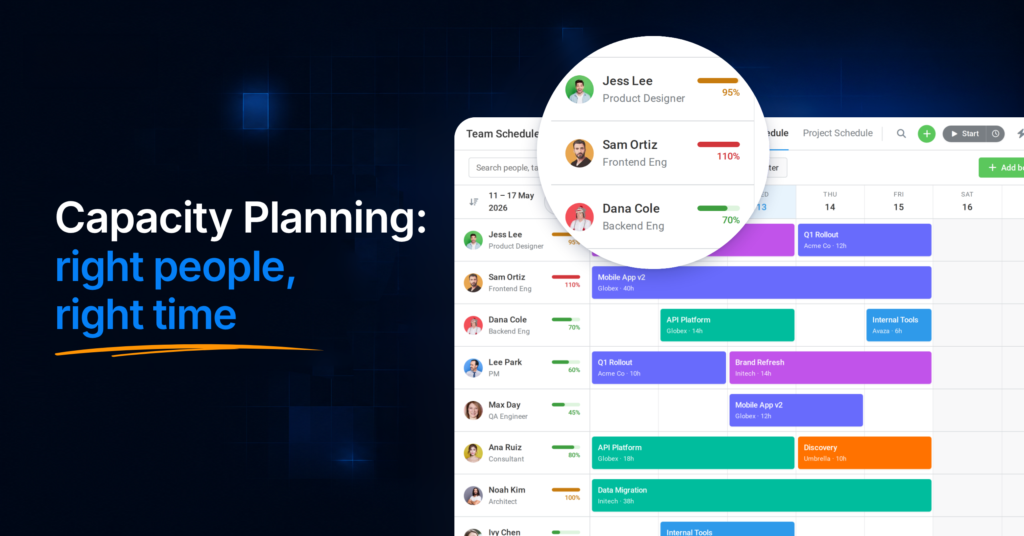
Avaza’s Project Resource Scheduling gives teams a visual, drag-and-drop scheduling layer where managers can see who is available, who is overbooked, and where skills gaps exist.
The recently upgraded Team Schedule shows each team member’s scheduled hours, standard hours and utilisation for any selected period, with overbooked utilisation flagged in red, a team-wide total available figure, and the option to sort the team by availability. Managers can save, share and reorder custom views of the schedule, so a delivery lead’s preferred date range, filters and sort order are always one click away.

Recurring Schedule Bookings let firms set up standing allocations for retainer-based engagements, which is essential for agencies managing ongoing client relationships where the same team needs to be available week after week. Availability reflects each person’s standard hours and existing bookings, and leave and public holidays sit on the schedule so bookings can be planned around them, which means the capacity view reflects real working hours rather than theoretical maximums.

The scheduling view connects directly to timesheets. As team members log actual time, planned bookings can be compared against actuals, turning the capacity plan into a living forecast rather than a static calendar. Utilisation reporting then shows whether the balance between billable and non-billable time is hitting the firm’s targets, and Avaza’s capacity forecasting tools help leaders look ahead at team workload and demand across the coming weeks.
From Capacity to Cash
In practice, the biggest limitation of standalone capacity planning tools is that they answer whether you have the people, but not whether the work is commercially healthy. Avaza closes that gap because it connects resource scheduling to invoicing, expense tracking, project budget management and business reporting.
One UK software and IT services firm with more than 100 people uses Avaza to capture time and expenses across T&M, fixed-fee, support, R&D and pre-sales work. Each client project has a designated timesheet and expense approver, typically the project manager, while time recorded against internal work is routed to line managers for approval. Notes are required on timesheet entries, and closed periods are locked so historical figures cannot change after month-end reporting.
Leadership receives a Staff Utilisation report each week and uses it alongside project and expense reporting to identify over- and under-utilisation and adjust assignments. The capacity-planning lesson is straightforward i.e., a forecast is only as trustworthy as the actual hours feeding it. At 100+ users, complete and approved time data is what turns utilisation reporting into a dependable staffing signal.

There is public evidence of the same operating model at INFORM DataLab, a 50+ employee data and IT professional services firm. INFORM uses Avaza across quoting, projects, scheduling, time tracking and invoicing, with Avaza’s APIs and webhooks feeding operational data into its data warehouse for KPI modelling and analysis. Avaza acts as the firm’s operational system of record, giving delivery and leadership teams a consistent source for staffing, project, utilisation and financial data.
This operating-chain approach means capacity decisions are also commercial decisions. When a COO asks “can we take on this new engagement?”, the answer draws on real scheduling data, actual utilisation history and financial context, not a guess based on a standalone resource calendar.
Quoting, Billing Models and the Full Project Lifecycle
Most capacity planning tools stop at scheduling. Avaza starts earlier and finishes later.
Quotes and estimates let firms scope engagements with budget parameters before scheduling begins, so the capacity question is connected to the commercial commitment from the start. When the project moves to delivery, timesheets capture billable and non-billable hours at the task level with configurable rates per person, per category or per project. Approved timesheets flow directly into invoicing, with support for recurring, retainer and milestone billing, which eliminates the manual reconciliation step that plagues firms using disconnected tools.
For firms managing the complexity of mixed billing models, which is increasingly common among mid-market consultancies, this connected lifecycle means the capacity plan, the delivery actuals and the billing output all draw from the same data, which reduces reconciliation and supports more consistent reporting across planning, delivery and billing.
Workload Visibility and Team Health
Capacity planning is ultimately about people. Overutilised teams burn out, underutilised teams cost margin, and invisible workload imbalances create both problems simultaneously. Avaza’s workload management tools give managers a clear view of team workload, with an availability bar and per-person utilisation figures that make it possible to spot overallocation before it becomes a delivery problem.
Custom Views let managers save their preferred perspectives across tasks, projects and schedules, making recurring workload and capacity reviews easier to return to without rebuilding the same filters and views each time.
The resource planning guide on Avaza’s site is worth reading for firms that want a structured framework for connecting capacity visibility to day-to-day scheduling decisions.
Pricing and Accessibility
Avaza uses plan-based pricing with bundled users by role, plus per-user add-ons where additional access is required. The Business plan costs US$47.95 per month and includes 10 Timesheet/Expense users, 5 Admin/Finance users and 1 Resource Scheduling user. Additional users in each of those roles cost US$7 per user per month.
For example, a 50-person delivery team where all 50 people need both Timesheet/Expense access and Resource Scheduling would cost roughly US$671 per month on the Business plan. Under the same assumption, a 100-person team would cost roughly US$1,371 per month. The actual figure depends on which permissions each person needs, so firms where scheduling or finance access is limited to a smaller group will pay less.
Unlimited project collaborators are included, so clients, contractors and other stakeholders who only need project collaboration do not require the same paid role access.
👉 Full pricing details and the team pricing calculator are available on Avaza’s pricing page.
That model is particularly relevant for mid-market services firms that need PSA depth without the implementation weight of a larger enterprise suite. For firms with 50+ billable staff, the value is less about having a low entry price and more about getting schedules, timesheets, expenses, billing and utilisation data into one shared operating system across multiple delivery teams.
Ease of adoption also matters more as headcount grows. Capacity forecasts depend on current schedules and consistent time capture across the delivery organisation; a sophisticated system only produces dependable planning data when people actually use it.
An Emerging Consideration: AI-Assisted Capacity Planning
Avaza’s MCP Server lets compatible AI environments such as ChatGPT and Claude work with live operational data across projects, schedules, timesheets and billing, subject to the authorising user’s permissions and Avaza’s API controls. For capacity planning, this can support practical workflows such as identifying available team members or surfacing missing timesheets without exporting operational data into another planning tool.

AI should be treated as an extension of the capacity-planning workflow rather than a replacement for human staffing and commercial judgement.
Best for: Professional services firms of 20 to 300+ people running multiple teams and billing models that want capacity planning connected to project delivery, scheduling, time, expenses, billing and reporting in one system.
🤙 Book a call to see how Avaza would fit your firm’s capacity, delivery and billing workflows → | 👉 Create a free account →

Frequently Asked Questions
What Is the Difference Between Capacity Planning and Resource Planning?
Capacity planning asks whether the firm has enough people, skills and hours for upcoming demand. Resource planning or allocation assigns specific people to confirmed work. Capacity is the portfolio-level forecast; allocation is the project-level execution.
What Utilisation Rate Should a Consultancy Target?
SPI Research reported average billable utilisation of 66.4% in 2025 and identifies 75% as an optimal benchmark. Individual targets should still vary by role: delivery specialists can carry higher billable expectations than managers who also handle oversight, mentoring and business development.
Can Capacity Planning Software Support Multi-Office Services Firms?
Yes. Multi-office firms need a shared capacity view that can still be filtered by office, team, role, skills, availability and local working patterns. At 100+ users, timesheet and expense approvals also matter because incomplete actuals make utilisation and staffing forecasts less reliable.
What Is the Difference Between Capacity Planning Software and a PSA Platform?
Capacity planning software focuses on future availability and demand. A PSA covers the broader operating chain – projects, scheduling, time, expenses, invoicing and reporting – with capacity planning as one connected capability.
When Should a Consultancy Choose PSA Over Standalone Capacity Planning?
A standalone scheduler can be enough when the main question is who is available and when. A PSA becomes more useful when resourcing decisions also need project budgets, approved time, expenses, billing models and profitability context.
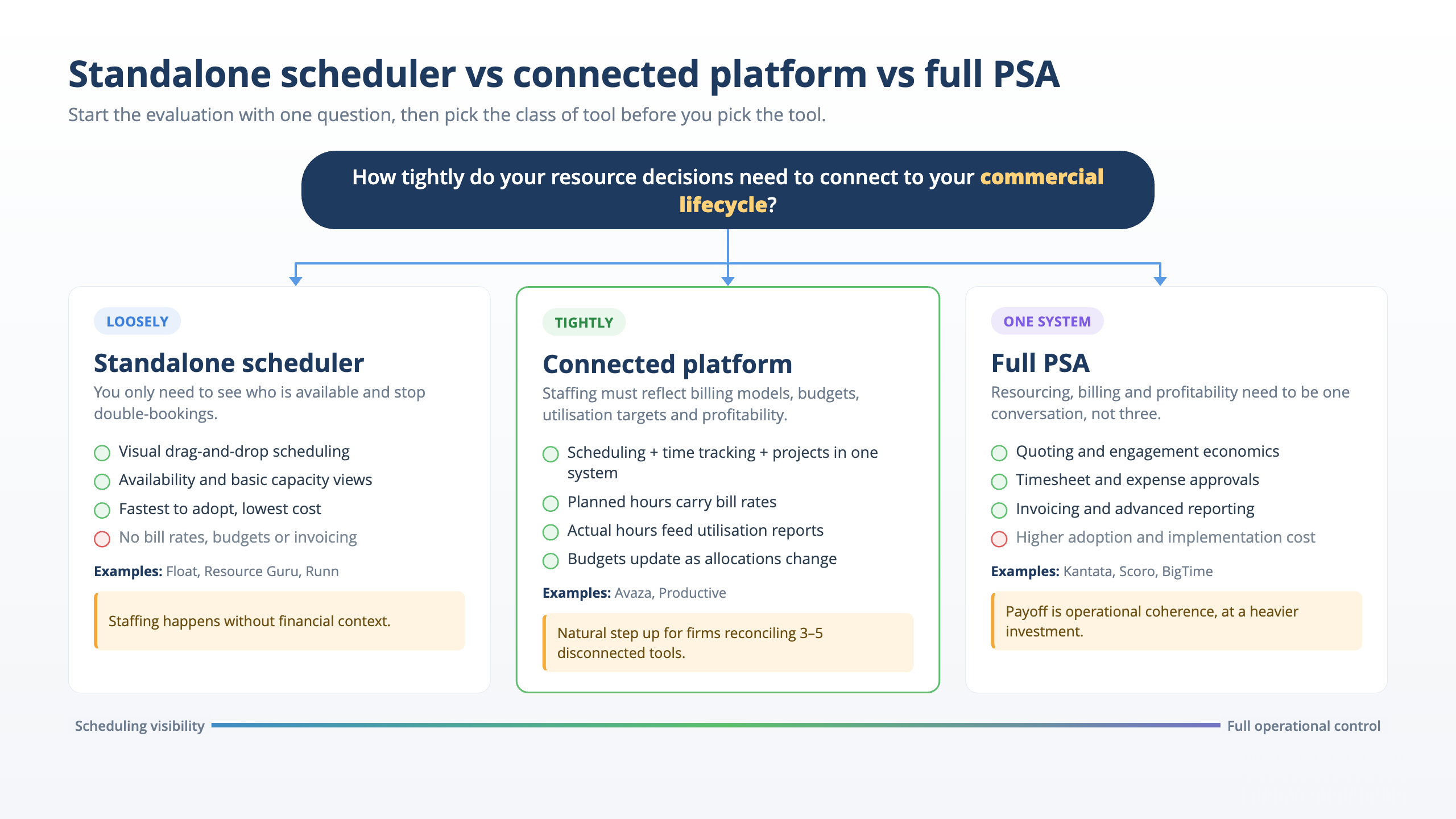
The trigger is operational complexity rather than a fixed headcount: multiple teams, offices, concurrent engagements or mixed billing models increase the cost of keeping scheduling separate from delivery and finance.
A connected PSA such as Avaza keeps scheduling, time, expenses, invoicing and reporting in the same operating system so capacity decisions use the same data that later drives billing and profitability analysis.
🤙 Book a call to see how Avaza would fit your firm’s capacity, delivery and billing workflows → | 👉 Create a free account →