
Why How AI Connects Has Suddenly Become a Real Question
How AI connects to your systems matters now because AI projects keep stalling on the same thing, and it is not the model, it is the plumbing. Operational data sits scattered across separate tools, and there is no safe, standard way for an assistant to reach it.
Here is what that looks like in practice.
Picture a data lead at a 60-person analytics consultancy. Leadership has been reading about AI assistants and asks what feels like a simple question. Can we point Claude at our project and billing data so people can just ask it things? The moment you try, you run into the actual problem. Project status lives in one tool, timesheets in another, expenses in a spreadsheet, invoices in the accounting system. The AI question turned out to be an operational question wearing a different hat. Before an assistant can answer “which projects are over budget this month,” something has to give it clean access to the projects, the time, the rates and the invoices, all at once.
This is the situation most services firms are in right now.
An AI initiative doesn’t fail because the model is weak. It stalls because the operational data is scattered, and nobody is sure how an assistant should be allowed to reach it. That is really a question about connected operations.
For a services firm, the operational system that carries all of this increasingly goes by a category name, Professional Services Automation, or PSA, meaning one connected platform that carries the whole chain from customer and quote through project, people, schedule, time and expenses to invoice and reporting, rather than treating each of those as a separate app.
Avaza is a connected PSA platform built around exactly that chain, used by firms like IT and software consultancies, data and analytics teams and agencies, which is why questions about how AI plugs into it come up so often.
It helps to know why this became urgent so fast.
The Model Context Protocol was built to solve what engineers call the N by M integration problem. Without a shared standard, every AI application has to be wired up separately to every tool, which means N tools times M assistants worth of custom integrations, and that never scales. MCP turns that into N plus M, where each tool and each assistant implements the standard once. That efficiency is why it spread.

In December 2025 Anthropic donated MCP to the Agentic AI Foundation under the Linux Foundation, making it a vendor-neutral standard, and by then there were already more than 10,000 active public MCP servers, with support across ChatGPT, Cursor, Gemini, Microsoft Copilot and VS Code. In other words, this is a genuine industry standard now, not one vendor’s idea.
So the practical question for an operations or data leader is not “should we care about any of this,” but “which of these three connection methods does what, and how do we keep AI access safe.” Here is the honest version.
The Three Ways Software Talks: APIs, Webhooks and MCP
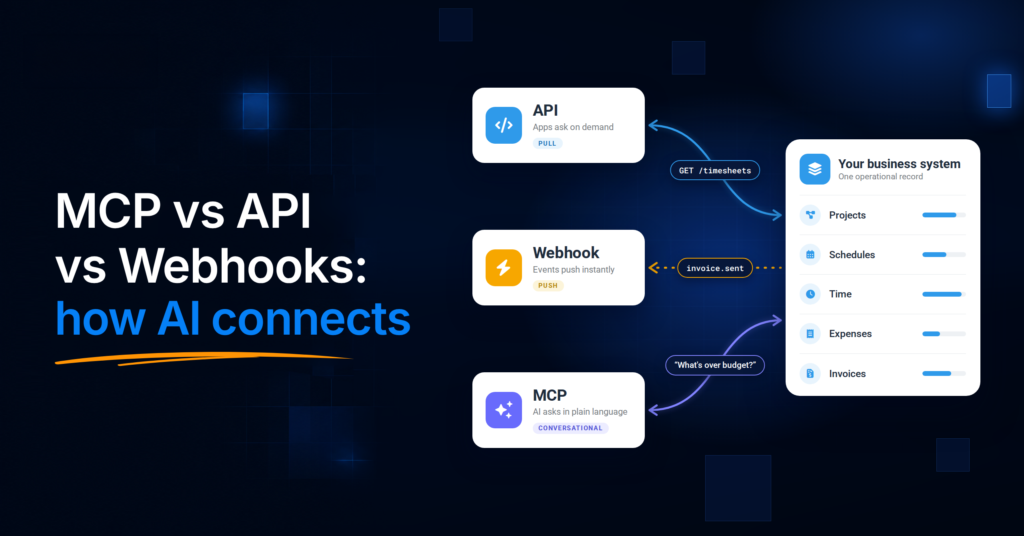
Three primitives cover almost everything. They overlap in what data they touch, but they differ in who starts the conversation and who is meant to consume the result.

What an API Is
An API, or application programming interface, is the request and response contract between two systems. Your software asks a defined question at a defined endpoint, and the other system answers in a structured, predictable way. APIs have been the foundation of software integration for decades because they are reliable and repeatable, which makes them ideal for stable, programmed exchanges.
The trade-off is that they are explicitly built. Each type of request needs a developer to define it. Avaza’s own API is a REST API that uses OAuth 2.0 and personal access tokens, and it returns only the data the authenticating user is allowed to see, filtered by that user’s role. That last detail matters more than it sounds, and it comes back when we talk about governance.
What a Webhook Is
A webhook flips the direction. Instead of your software repeatedly asking an API “has anything changed yet,” the source system pushes a message to a URL you choose the moment an event happens. An API is a pull, where you initiate the request. A webhook is a push, where the event initiates it. If you want to poll for a status that changes twice a day, you are wasting effort, and a webhook is the better fit, because the system simply tells you when the thing occurs.
Avaza supports webhook notifications for exactly this kind of event-driven workflow, so a change in one place can trigger action somewhere else without anyone polling for it.
What MCP Is
MCP, the Model Context Protocol, is an open standard introduced by Anthropic in November 2024 for connecting AI assistants to external data and tools. It uses a straightforward client and server model. The AI application is the client, and it connects to an MCP server that exposes a set of tools the assistant can use.
The important thing to understand is what MCP is for.
It is not a new database or a replacement for your systems. It is an access layer that lets an assistant use your existing operational data and actions in natural language, so a person can ask a question in plain English and the assistant can retrieve the answer or carry out a permitted task. Remote MCP connections are secured with OAuth, the same token-based standard that protects a normal API, so the assistant connects as an identifiable, permissioned user rather than as an anonymous tourist.

That distinction, MCP as an access layer rather than a product, is the single most useful idea in this whole comparison. Hold onto it, because it is what stops people from believing MCP will replace the systems they already run.
MCP vs API vs Webhooks: The Core Differences
The cleanest way to keep these straight is to ask who starts the request and who is meant to consume the answer. Here is the side by side.
| Aspect | API | Webhook | MCP |
|---|---|---|---|
| What it is | A request and response contract between two systems | An event-driven push from a source system to a URL you choose | An access layer that lets an AI assistant use your data and actions in natural language |
| Who starts it | Your application, on demand | The event, the instant it happens | A person, by asking the AI assistant |
| Best when | You need predictable, repeatable data or actions between applications | You need to react to something the moment it changes, without polling | You want people to query or act on live operational data conversationally, through AI |
| Direction | Pull (you ask) | Push (it tells you) | Conversational (the assistant asks on a person’s behalf) |
| Reads and writes | Both, defined per endpoint | Notifies; the follow-up action runs through an API | Both, bounded by the authorising user’s role and your permission settings |
| Everyday example | A billing app pulls this month’s approved timesheets to raise invoices | An invoice is sent and a webhook triggers the next step in your workflow | A delivery director asks an assistant “which projects are over budget?” and gets an answer from live data |
One line worth pinning down, because it is where people get confused. What MCP lets an assistant do today is real and specific. It can retrieve, and where you allow it, change actual records. What sits further out, meaning agents reasoning autonomously across margin and staffing without a person in the loop, is a direction the industry is heading, not something you switch on today. Keep those two mentally separate whenever you read a vendor’s AI claims, including ours.
When Should You Use Each One?
The decision rule is simpler than the marketing around it. Route the request to whoever is consuming the data.
If deterministic application code needs stable, predictable behaviour, use an API. Application-to-application work, where you know exactly what you are asking for and need the same answer every time, is what APIs are built for.
If you need to react to an event the moment it happens rather than checking on a schedule, use a webhook. When a new project is created, an invoice is sent or a timesheet entry is created, the source system pushes the event and your workflow responds.
If you want people to reach live operational data in natural language through an AI assistant, use MCP. This is the “let me just ask it” layer, and it is the one that did not really exist in a standardised form until recently.
In most real setups you use all three, because they read from the same underlying data and simply serve different consumers. There is an honest caveat here. If all you need is a couple of fixed actions and your APIs already exist, a direct API call or plain function calling can be quicker to stand up than adopting a whole protocol. MCP’s payoff shows up as your tool ecosystem grows, when standardised discovery and reusable connectors save you from rebuilding a bespoke integration for every new assistant.
If you are wiring up two actions, you may not need MCP yet. If you expect to connect several assistants to a growing set of tools, you probably will.
You can see how Avaza connects with the rest of your software stack on the Integrations page.
MCP in Practice: Claude Connectors and the Tools You Already Use
One of the easiest ways to see an MCP integration in practice is through Claude connectors. A connector is an MCP connection that lets Claude reach an application, read the data a user is allowed to access and, where supported, take actions in it.
The value becomes more obvious when several connectors are active in the same conversation. Claude can work across tools such as Google Drive, Gmail, Google Calendar, Slack, Linear and Avaza without requiring a custom integration between every pair of applications.
That makes requests like these possible:
- “Find last week’s unsubmitted timesheets in Avaza and draft a Slack reminder to each project lead.”
- “Read the statement of work in Google Drive and compare it with the hours logged against that project in Avaza. Flag anything drifting out of scope.”
- “Summarise yesterday’s client emails and add the follow-ups as tasks on the right Avaza projects.”

Avaza connects to Claude as a custom connector through the Avaza MCP Server and a standard OAuth sign-in. Each person connects using their own Avaza account, so the connection inherits that user’s permissions and can be narrowed further through Avaza’s API Permissions.
On Claude Team and Enterprise plans, Owners can add another layer of control by setting connector actions to Always allow, Needs approval or Blocked. Because information can move between connected tools inside a conversation, organisations should also decide deliberately which connectors people are allowed to use together.
What You Connect AI to Matters More Than How
APIs, webhooks and MCP are access methods. What ultimately determines the quality of an AI answer is the operational context behind them.
If projects live in one system, schedules in another, time and expenses somewhere else and billing in the accounting platform, an assistant sees fragments. Connecting AI to more fragmented tools does not automatically give it a coherent picture of the business.

For a professional-services firm, the stronger foundation is an operational system that connects the workflow from quote to project, resource scheduling, time and expenses, invoicing and reporting. Avaza brings those records together, so an assistant can work from shared operational context rather than an isolated task list or individual data source.
That matters when a question crosses functional boundaries. A delivery lead asking which projects are burning budget too quickly may need project scope, rates and logged time. A manager checking upcoming capacity needs schedules and resource assignments. A billing question may depend on approved time, expenses and invoice data.
When evaluating whether an operational system is ready for AI, four checks are useful:
- Is project, capacity, time, expense and billing data connected?
- Is the platform open through APIs, webhooks and MCP, so different kinds of integrations can use the appropriate interface?
- Can administrators govern access by module and action?
- Can the system produce reporting you already trust?
Avaza supports that model across its paid plans. The practical advantage is not AI access for its own sake. It is giving AI access to operational data that already reflects how work is sold, staffed, delivered and billed, so natural-language questions are grounded in the same information the business already uses to operate.
How This Looks in One Connected System
Frameworks are easier to trust when you can see them running somewhere real, so here is a worked example.
Consider INFORM DataLab, a European data and BI consultancy operating at enterprise scale.
It runs its quoting, projects, schedules, time and invoicing in Avaza, so the operational record lives in one place. From there, Avaza’s APIs and webhooks feed that operational data into a Snowflake warehouse, with Qlik and Power BI for analysis, alongside the firm’s own CRM and accounting tools. That is the API and webhook layer doing exactly what it is good at, which is moving structured, reliable data between applications, so the firm gets warehouse-grade business reporting without stitching everything together by hand.
Now add the AI layer on top.
Through Avaza’s MCP Server, a compatible assistant like ChatGPT or Claude can reach the same connected operational context in natural language. Its current coverage spans projects, tasks, schedules, timesheets, expenses, estimates, invoices, approvals and payments. So someone can ask an assistant to check a project’s status, find missing timesheets before month-end, or review what is ready to bill, and where you permit it, the assistant can create, update and delete records, not just read them.
Authorised users can approve or reject timesheets, and submit expenses for approval, and payments can be created and applied to invoices. The point is not the number of available actions. It is that the assistant is working from the whole commercial picture, meaning who the customer is, what was agreed, who is scheduled, what time is logged and what is billable, rather than a thin slice of tasks.

It helps to picture the same idea in two other kinds of firm, because the ICP for this is broad.
At an IT and software consultancy running several fixed-fee and time-and-materials engagements at once, a delivery lead can ask an assistant which projects are burning budget faster than planned, and the answer draws on live time, rates and scope in one system rather than a stale spreadsheet.
At a digital agency juggling retainers and project work, an account director can ask what is unbilled across active clients heading into month-end, and get a straight answer because the time, expenses and invoicing already live together.
In each case the value is the same.
The assistant is only as good as the connected data beneath it, and the firms getting real answers are the ones whose operations are already joined up.
This is the difference between a system of record and a system of intelligence.
Avaza is the operational system of record, meaning the reliable, connected source of truth about projects, people, time, cost and billing. The BI stack and the AI assistant are systems of intelligence built on top of it. The same clean, connected data that makes the reporting trustworthy is what makes AI output trustworthy too. An assistant that can see tasks but not rates, schedules, time, expenses or invoices cannot protect a margin, because it cannot see the margin.
Breadth underneath is what makes intelligence on top worth anything.
Keeping AI Access Governed
Avaza’s MCP connection uses OAuth 2.0 and runs under the permissions of the user who authorises it. API Permissions let administrators narrow that access further by module and action, including Read, Create, Update and Delete, apply user-level overrides, block API access for specific users and set a per-user hourly deletion cap.

There is no general Avaza review queue where every API or MCP action waits for approval. However, existing timesheet and expense approval workflows still apply to records submitted through an assistant, and organisations can make those approvals mandatory. AI submissions do not bypass those workflows.
Deletes have an additional safeguard. Through Avaza’s MCP, a delete is a two-step action: the assistant first previews the deletion and then requires a separate confirmation. Clients that support it can present that confirmation through an interactive card.
AI clients can add another layer of control too. On Claude Team and Enterprise, for example, Owners can set connector actions to Always allow, Needs approval or Blocked. These controls can narrow what the AI is allowed to do, but they do not expand the user’s underlying permissions in Avaza.
For a deeper look at permissions, approval controls and governing AI access, see Governed AI at Work.
Does MCP Replace Your API or Integrations?
No. MCP is an access layer that sits on top of your existing systems, not a replacement for them. You still need APIs for deterministic application-to-application work, and you still need webhooks for event-driven reactions, because assistants are not the only thing consuming your data. Your BI stack, your accounting sync and your automations all keep running on the API and webhook layer.

What MCP does remove is the need to build a bespoke, AI-specific integration for every assistant you want to connect. Before a shared standard existed, giving three different AI tools access to your systems meant three separate custom builds. MCP collapses that into one standard connection. So it replaces the custom glue for AI access, not the underlying rails. The API, the webhooks and the MCP connection all read from the same operational data. They are three doors into one house, opened by different people for different reasons.
Where This Is Heading
It is worth being clear about the line between today and tomorrow.
Today, an assistant connected through MCP can retrieve live operational data and, within the permissions you set, carry out defined actions like updating a record or preparing a billing review for a person to check. As governed agents mature, the interesting direction is assistants that can reason across more of the commercial picture at once, weighing margin, staffing and retainer burn to surface options a manager then decides on.
That future is a reason to get the foundation right now, not a capability to claim today. The firms that will benefit are the ones whose operational data is already connected and governed, because an agent is only ever as good as the context and the controls beneath it.