
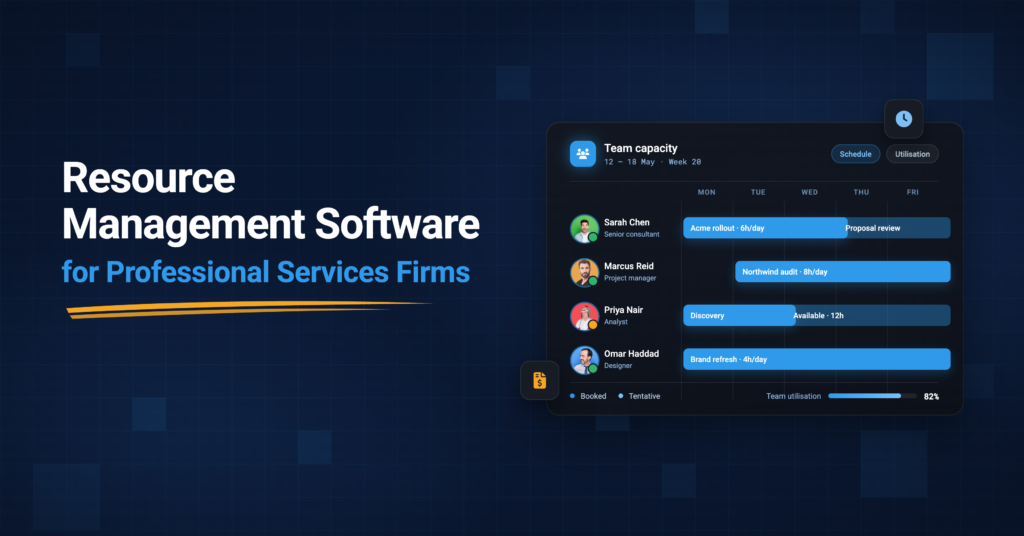
What Resource Management Software Actually Does for Professional Services Teams
Resource management software is a platform that helps professional services firms plan, schedule and track how their people are allocated across client engagements. It provides a shared, real-time view of who is working on what, who has capacity and where scheduling conflicts exist, so that managers can make staffing decisions based on actual data rather than memory, spreadsheets or corridor conversations.
That definition is accurate but incomplete for services firms.
In a consultancy, an agency or an engineering practice, resource decisions are not just operational logistics. They are commercial decisions.
- Every allocation carries a billing rate.
- Every hour has a cost.
- Every scheduling choice either protects a project’s margin or erodes it.
Resource management software built for professional services connects those allocation decisions to the financial context around them, which is exactly what generic task management tools and standalone calendar schedulers do not do.
For growing services firms, the most complete resource management tools overlap with a category called Professional Services Automation, or PSA. A PSA platform connects the full operating chain, from project delivery and resource planning through time tracking, expense management, billing and reporting, so that scheduling decisions are made with visibility into not just availability but also utilisation rates, billing models, project budgets and profitability.

The distinction matters because a scheduling tool that cannot answer “will staffing this engagement make us money or lose it?” is only solving half the resource management problem.
Why Professional Services Firms Need Purpose-Built Resource Management
General-purpose project management tools do a good job of tracking tasks. They were not designed to answer the questions professional services leaders ask every week. Who has capacity in the next sprint? What is our billable utilisation this month? How much unbilled time is sitting in the system? Can we take on this new engagement without overloading the team that is already at 90%?
Those questions require data that lives at the intersection of scheduling, time tracking and billing, not in a task board. When that data lives in separate tools (or worse, in someone’s memory), the answers come late, incomplete or wrong.
SPI Research’s 2025 Professional Services Maturity Benchmark measured the cost of that gap.
Average billable utilisation across the industry fell to 66.4% in 2025, the lowest level SPI has recorded, and EBITDA margins dropped to 9.8% in 2024 in direct correlation. Four consecutive years of utilisation decline, even as deal pipelines strengthened (175% of quarterly bookings forecast in 2025), tells a clear story. The bottleneck is not demand. It is the operational capacity to staff, deliver and bill efficiently.
Core Capabilities That Matter for Professional Services Firms
Not every resource management feature matters equally for services firms. The capabilities that drive real value are the ones that connect people’s decisions to commercial outcomes.
Resource scheduling and visual planning. You need the ability to see your team’s availability across engagements on a shared timeline, assign people to projects, and adjust allocations as priorities shift. Drag-and-drop interfaces, colour-coded availability indicators and conflict detection are table stakes. What separates good scheduling from great scheduling is whether the view includes financial context, meaning bill rates, project budgets and the impact of a staffing change on margin.
Avaza’s resource scheduling shows team and project views with an availability bar and per-person utilisation figures, making availability, capacity and utilisation visible in one place. You can explore the top features that define best-in-class resource scheduling software for a deeper look at what to evaluate.

Utilisation tracking and reporting. Utilisation is the single metric that connects resource management to revenue. It measures how much of a team’s available time is spent on billable, client-facing work. For most professional services firms, the healthy range falls between 74% and 84% billable utilisation. Below 74%, revenue per consultant typically drops below break-even. Above 85%, the risk shifts to burnout and declining delivery quality.
The 2025 industry average of 66.4% means the typical firm is leaving significant revenue on the table, not because people are idle, but because time is not captured, not billed, or allocated to non-billable work that could be redistributed. Firms with real-time resource utilisation visibility achieve 8 to 12 percentage points higher billable utilisation than firms relying on manual tracking, per SPI Research. At scale, that gap translates directly to revenue. Every 1 percentage point of utilisation recovered is worth approximately €2,500 to €4,000 per consultant per year. In Avaza, time tracking and resource scheduling roll up into utilisation and capacity reports automatically, so these calculations surface at the person, project, category and user tag level without spreadsheets.

Capacity planning and demand forecasting. Scheduling tells you what is happening now. Capacity planning tells you what will happen next quarter. Professional services firms need to model forward demand against available capacity across roles, skills and geographies so they can hire proactively, subcontract strategically, or decline work they cannot staff without overloading the team.
Explore ▶️ Capacity Planning For Professional Services Firms
Skills and role-based matching. Availability alone does not make someone the right fit for an engagement. Resource management software that supports skills tagging, role classification and proficiency levels helps managers match the right expertise to the right project, which affects both delivery quality and client satisfaction.
Time tracking integration. Resource scheduling and time tracking are two sides of the same coin.
The schedule is the plan; the timesheet is the reality.
When both live in the same system, planned versus actual utilisation becomes visible in real time, and discrepancies surface before they become month-end surprises. Disconnected time tracking is one of the largest drivers of revenue leakage. The average professional services firm loses approximately 4.5% of revenue to billable work that never reaches an invoice, per SPI Research’s 2026 benchmark.
For consultants specifically, Avaza distinguishes billable versus non-billable hours at the project, task and team-member level, and converts approved time entries directly into invoices grouped by project, resource or task.
Resource Allocation vs Resource Scheduling vs Capacity Planning
These three terms are often used interchangeably, but they describe different activities with different time horizons. Getting the distinction right matters for choosing the right tool.
| Concept | What It Answers | Time Horizon | Example |
|---|---|---|---|
| Resource allocation | Who should work on this project, and for how many hours? | Current and near-term | Assigning a senior consultant to 60% of a 12-week engagement |
| Resource scheduling | When exactly will this person work on this project, day by day? | Days to weeks | Blocking Tuesday and Thursday mornings for client delivery |
| Capacity planning | Do we have enough people with the right skills to meet demand over the next quarter? | Weeks to months | Forecasting whether the pipeline requires two additional hires by Q4 |
Standalone schedulers typically handle scheduling well but stop there. Connected platforms handle all three and tie them back to financial data. The right choice depends on what gaps the firm needs to close. You can read more about how resource planning connects scheduling, capacity and billing in practice.
Top Resource Management Software for Professional Services Firms
The resource management software market spans three tiers, from focused schedulers to full PSA platforms. The right pick depends on what the firm needs to connect. Here are the platforms that professional services teams evaluate most often, grouped by the class of tool they represent.
1. Avaza
Avaza is a connected platform that brings resource scheduling, time tracking, project management, expense management, invoicing and reporting into one system. Rather than treating scheduling as a standalone function, Avaza connects it to the full operating chain, running from customer to quote to project to people to schedule to time to expenses to invoice to reporting. That means every resource decision carries financial context from the moment it is made.
For professional services firms in the 10 to 200 person range, this breadth solves the most common frustration with point tools. A delivery director checking team capacity, a finance lead reviewing unbilled time and a resource manager rescheduling a team member are all looking at the same data, without reconciling across three or four disconnected systems.
Resource Scheduling and Workload Visibility
Avaza’s resource scheduling provides team and project views with an availability bar and per-person utilisation figures, so availability, capacity and utilisation are visible in one place. Managers can assign people to projects using drag-and-drop and adjust allocations as priorities shift; overbooking is flagged, and leave and public holidays sit on the schedule so bookings can be planned around them. Skill and user tag filtering helps surface capacity fit, not just raw hours available.
For firms managing retainers or ongoing engagements, recurring schedule bookings allow teams to set repeating resource allocations rather than rebuilding them each period. And because each user can save their own custom views of project and resource data, different roles across the firm, from operations to finance, see the slice of scheduling information that matters most to them.
You can explore the top features that define best-in-class resource scheduling for a more detailed look at what Avaza covers here.
Time Tracking, Utilisation and Reporting
The schedule is the plan. The timesheet is the reality.
In Avaza, both live in the same system, so planned versus actual utilisation surfaces in real time rather than arriving as a month-end surprise. Time tracking supports start/stop timers, manual entry and mobile logging, with billable and non-billable hours clearly distinguished at the project, task and team-member level.
That time data rolls directly into utilisation and capacity reports, which is where the commercial value becomes visible. Rather than exporting timesheets to a spreadsheet and building pivot tables, managers can see staff utilisation by person, project, category or user tag, compare scheduled versus actual time and identify where billable hours are being lost to non-billable work.
Customers consistently name utilisation reporting as Avaza’s standout capability, describing the platform as a “main source of truth” that puts “data at your fingertips.” For a deeper guide on how to measure and improve resource utilisation, that topic gets dedicated coverage.
Billing, Invoicing and Revenue Protection
This is where Avaza’s connected operating chain pays off most directly for professional services firms. Approved timesheets convert into line-itemised invoices with a few clicks, grouped by project, resource, task or category. Expenses pull into the same billing view, so clients receive a consolidated picture of services delivered and the firm does not lose billable costs to manual reconciliation.

For firms managing ongoing client work, recurring invoicing automates the billing cycle for retainers and regular engagements. The platform supports multiple billing configurations per project, including per-member rates, project-wide hourly rates and category-based rates, so mixed billing models do not require workarounds. Because time, expenses and invoicing share the same data layer, the gap between work performed and work billed, the 4.5% revenue leakage that SPI Research documents across the industry, becomes structurally smaller.
For consultants managing time-based billing across multiple client engagements, this connection between tracked effort and issued invoice is the feature that most directly protects margin.
Pricing and Plan Structure
Avaza uses account-based pricing rather than a flat per-user model. Plans run from Free through Startup ($11.95/month), Basic ($23.95/month) and Business ($47.95/month), with each plan including a set number of users per role. The Business plan, for example, includes 10 timesheet and expense users, 5 admin and finance users and 1 scheduling user. Additional role access is $7 per user per month. Every plan includes unlimited project collaborators.
This structure means a firm pays for the roles people actually use rather than a blanket licence for every person who touches a project. The free plan includes 1 scheduling user, so smaller teams or firms evaluating the platform can start without financial commitment.
Full pricing details are published transparently on the Avaza site.
AI Access and Governed Extensibility
For firms exploring AI assistants or internal automation, Avaza provides governed access across connected workflows through its MCP Server. Compatible AI assistants like ChatGPT and Claude can query schedules, timesheets, project data, invoices and more. Where API Permissions allow, assistants can also create or update records, including scheduling records, always bounded by the authorising user’s existing role. Admins control Read, Create, Update and Delete access by module and can set stricter restrictions for individual users, so a firm retains full control over what any AI assistant can see or change.
A significant Team Schedule upgrade shipped in August 2026. The Team Schedule now supports custom views that can be saved, shared, copied and reordered, with sort order, date range, bar size, zoom level and filters remembered per view. A date range selector shows each team member’s scheduled hours, standard hours and utilisation for the selected period, with overbooked percentages flagged in red, alongside a team-wide Total Available figure and the option to sort by availability. Filters are split between row visibility (Schedule Users, User Tags) and booking visibility (Customers, Projects, Categories, Tags), so managers see exactly the bookings they filtered for without losing sight of who has capacity. This strengthens Avaza’s foundation for future AI-assisted scheduling. AI access is an increasingly relevant evaluation criterion, and governed access across connected workflows can be a meaningful tiebreaker for firms already weighing comparable platforms.

Where Avaza Fits and Where It Does Not
Avaza is strongest for professional services firms that need scheduling, time tracking, billing and reporting in one place without the implementation overhead and cost of enterprise PSA platforms like Kantata or Certinia. It works well for consultancies, agencies and engineering firms with mixed billing models and multiple concurrent client engagements.
Teams that need advanced AI-driven auto-staffing, deep Salesforce pipeline integration, algorithmic resource matching across hundreds of consultants, or multi-entity global billing will find those capabilities in enterprise-tier platforms. Avaza does not position itself in that category. Its advantage is the connected operating chain at a price point and adoption speed that heavyweight PSAs do not match.
Sign up and request a free trial to test it out for your team at signup.avaza.com. If you would prefer a walkthrough first, book a call with the Avaza team.
2. Float
Float is a dedicated resource scheduling platform designed to give delivery and operations leaders a clear, visual view of team availability across projects. Its drag-and-drop timeline, real-time capacity views and pre-filled timesheets make it one of the simplest tools to adopt. Float’s Starter plan begins at $7.50 per scheduled person per month (billed annually), with a Pro plan at $12.50. Float excels at scheduling and workload visibility, and it has added budget, margin and profitability tracking in recent updates. It works best for agencies and PS teams that already have separate billing and accounting systems and need a focused scheduling layer alongside them.
The trade-off is that Float does not include invoicing, expense management or a full quote-to-cash flow, so firms needing those capabilities either pair Float with other tools or evaluate a connected platform.
3. Kantata
Kantata (formed from the merger of Mavenlink and Kimble PSA) is an enterprise-grade PSA platform built for consulting firms, IT services organisations and staffing businesses above roughly 100 to 150 billable resources. Its resource management depth includes skills-based staffing, utilisation analytics, scenario forecasting across a large consultant bench and deep Salesforce integration that connects deal pipeline to resourced delivery. Kantata does not publish pricing. Industry benchmarks suggest full users typically range from $45 to $90 per user per month, with a 50-seat minimum that makes it a significant investment.
Kantata is strongest for firms that need algorithmic resource matching at scale and have the budget and implementation capacity for a heavyweight PSA deployment. Smaller firms or those seeking faster time-to-value may find the onboarding and cost prohibitive.
4. Productive
Productive is an agency and professional services management platform that combines resource planning with project delivery, budgeting and profitability tracking. Resource decisions carry real-time margin impact, and utilisation tracking shows billable versus non-billable hours per person with targets you can set by role or department.
Productive is strongest for agencies and PS firms that want financial visibility tightly linked to scheduling without going to a full enterprise PSA. It has a growing but still smaller integration ecosystem compared to larger competitors.
5. Scoro
Scoro is a professional services automation platform that connects resource planning, project delivery, sales, quoting, budgets, time, invoicing, costs and profitability in one system. It provides live views of availability, workload, utilisation and bookings. Scoro works well for firms that want staffing decisions to reflect project and financial performance, with strong quoting and financial tracking capabilities. Pricing starts at $26 per user per month for the Essential plan.
6. Resource Guru and Runn (Standalone Schedulers)
For firms whose primary gap is scheduling visibility, several focused tools serve the purpose well. Resource Guru offers straightforward drag-and-drop scheduling, leave management and an “Availability Bar” that quickly shows team capacity, at an affordable price point. Runn provides forward-looking capacity forecasting with a clean interface, making it a strong choice for teams transitioning from spreadsheets who need to see demand versus capacity over the coming months. These standalone schedulers are the fastest to adopt, the least expensive and the right choice for teams that already have dependable billing, time tracking and accounting systems elsewhere.
The trade-off, as discussed throughout this guide, is that scheduling happens without financial context.
7. BigTime
BigTime is an accounting-first PSA tool focused on tracking utilisation and project profitability for IT consulting, engineering and accounting-adjacent firms. Its billing accuracy features, including detailed rate configurations and invoice-level controls, make it a strong fit for firms where time-based billing precision is the primary operational lever. BigTime is strongest for firms that prioritise billing and financial reporting above visual scheduling or resource planning UX.
Each of these tools fits a different point on the spectrum from scheduling visibility to full operational control. The evaluation framework in the next section helps determine which class of tool matches the firm’s actual needs.
How Resource Management Software Protects Margins and Improves Delivery
The business case for resource management software in professional services is not about features. It is about closing three gaps that directly affect profitability.
The utilisation gap. When resource allocation relies on spreadsheets and verbal check-ins, overallocation and underutilisation coexist in the same firm. Someone is at 110% while someone else has capacity that nobody can see. Resource management software makes the imbalance visible and actionable before it becomes a retention problem or a delivery failure. SPI Research’s maturity data makes the payoff concrete. In 2024, firms at Maturity Level 5 (the most operationally mature) saw a 71% improvement in billable utilisation over Level 1 organisations.
The billing gap. Professional services revenue leakage happens when billable work is performed but never invoiced, whether because time entries are incomplete, small tasks go unrecorded, or scope changes are not documented for billing.
The 2026 SPI benchmark puts average revenue leakage at 4.5% across the industry. For a firm generating $10 million in annual revenue, that represents $450,000 that evaporates not because clients refused to pay, but because nobody wrote it down and connected it to an invoice.
Resource management software that integrates with time tracking and billing does not eliminate human error, but it reduces the distance between the work and the invoice, which is where leakage concentrates.
In Avaza, approved timesheets convert directly into line-itemised invoices, with expenses pulled into the same billing view, so the gap between work delivered and work billed stays visible.
The delivery gap. On-time project delivery across professional services fell to 73.4% in 2024, per SPI Research. The most common cause is not poor execution but poor staffing. The right people were not available when the project needed them, or the team was overcommitted before delivery began. Resource management software with conflict detection and capacity forecasting catches these problems in the planning stage, not the post-mortem. You can explore how scheduling software improves delivery for project managers in more detail.
How to Choose Resource Management Software for Your Firm
The evaluation should start with one question. How tightly do your resource decisions need to connect to your commercial lifecycle?
If the firm’s primary need is seeing who is available and preventing double-bookings, a focused scheduling tool may be sufficient. If resource decisions need to reflect billing models, project budgets, utilisation targets and profitability, the firm needs a platform that connects scheduling to the financial layer. And if the firm wants one system for the entire operating chain, covering scheduling, time, expenses, billing and reporting, the evaluation moves into PSA territory.
Standalone Scheduler vs Connected Platform vs Full PSA
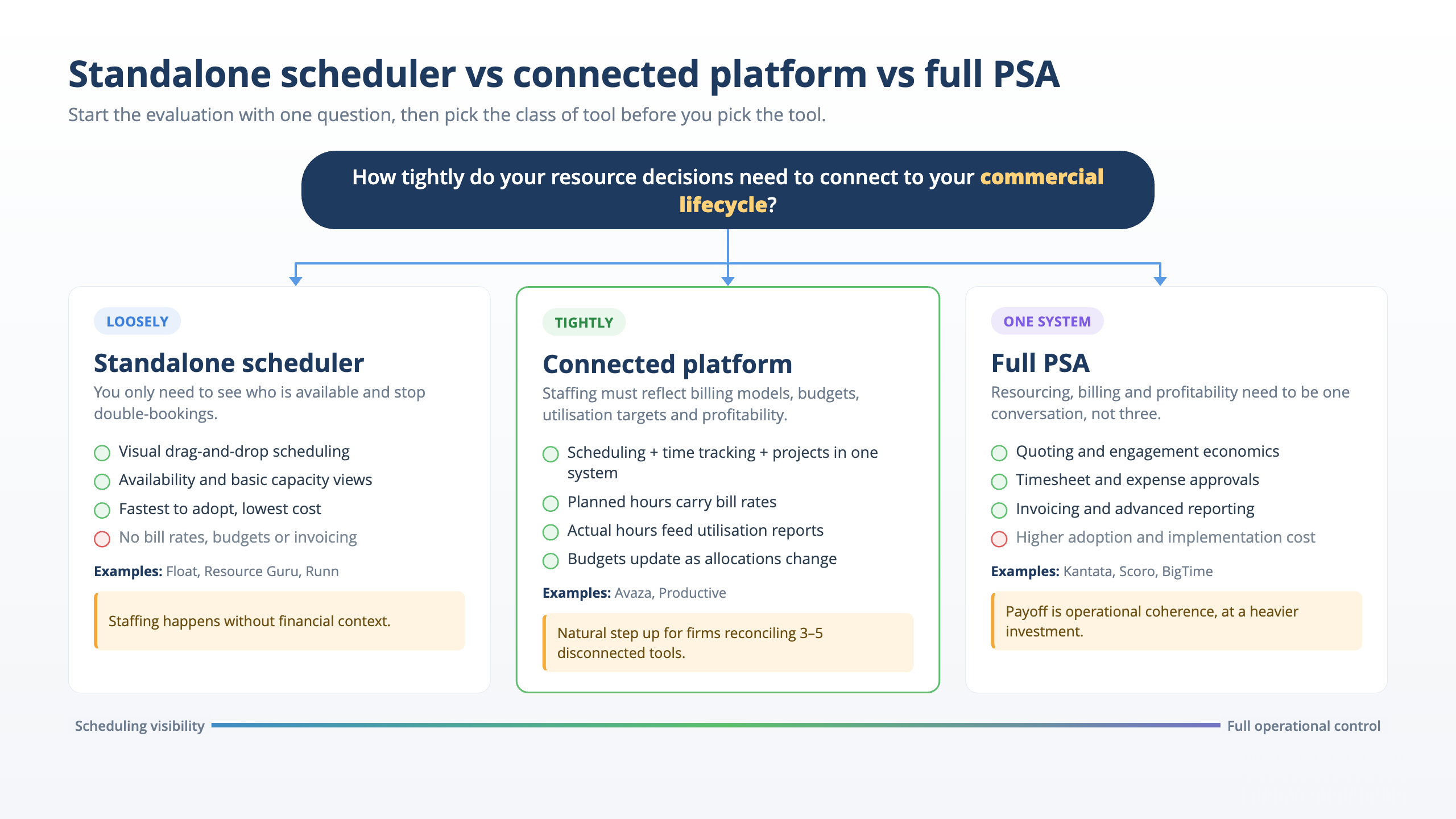
Standalone schedulers (Float, Resource Guru, Runn and similar) excel at visual scheduling, availability tracking and basic capacity views. They are typically the simplest to adopt, the fastest to implement and the least expensive. For teams that already have dependable project management, time tracking, billing and accounting systems in separate tools, a standalone scheduler fills the specific gap without replacing anything.
The trade-off is that staffing decisions happen without financial context. A manager can see that someone is available, but not whether assigning them at their billing rate makes the engagement profitable.
Connected platforms bring scheduling, time tracking, project management and reporting into one system. Resource decisions benefit from financial visibility, with planned hours carrying bill rates, actual hours feeding utilisation reports, and project budgets updating as allocations change.
For firms outgrowing spreadsheets or tired of reconciling data across three or four disconnected tools (58% of professional services firms use three to five separate tools to manage client work, per Teamwork’s Sprint to AI Report), this is often the natural step up.
Full PSA platforms add the complete commercial lifecycle, including quoting, engagement economics, invoicing, timesheet and expense approvals and advanced reporting. They are the right choice for firms where resource management, billing and profitability need to be one conversation, not three separate meetings with three separate dashboards. The adoption investment is higher, but the payoff is operational coherence.
Avaza sits in the connected-platform-to-PSA range. It brings project management, resource scheduling, time tracking, expense management, invoicing (including recurring invoicing for retainers) and reporting into one platform, with the connected operating chain running from customer to quote to project to people to schedule to time to expenses to invoice to reporting. That breadth means a delivery director can check utilisation, a finance lead can review unbilled time and a resource manager can reschedule a team member, all looking at the same data. The platform supports recurring schedule bookings for retainer and ongoing engagements, and custom views let each user save the resource and project views they use most.
Avaza is accessibly priced on an account-based model, where each plan includes a set number of users per role, with extra role access as a small per-user add-on, so a firm pays for the roles people actually use rather than a licence for every head.
Full pricing details are on the Avaza pricing page.
If this sounds like the right fit, you can create a free account to test it out for your team.
What to Look for in an Evaluation
Beyond the class-of-tool decision, these criteria separate the tools that work in practice from the ones that look good in a demo.
Does it connect to your financial data? The tool should show the cost and billing impact of a staffing decision before you make it, not after the invoice comes up short. If resourcing lives in one system and billing in another, utilisation data is always lagging.
Can it handle your billing models? Professional services firms increasingly mix time-and-materials with fixed fees, retainers, milestones and outcome-linked pricing. The resource management platform needs to understand that tracking effort matters even when the client is not billed by the hour, because the firm still needs delivery cost and margin visibility.
Does it integrate with your accounting stack? Clean data flows between the resource platform and the accounting system (Xero, QuickBooks) reduce reconciliation work and support more consistent reporting.
Will your team actually use it? Ease of adoption is not a nice-to-have. It is a data-quality issue. If the tool is too complex or too slow, people stop logging time accurately, which destroys the utilisation data the tool is supposed to provide. Customers frequently describe Avaza as “easy to work with,” “easy to learn” and “flexible.” That reputation matters because adoption drives data completeness, and data completeness drives reporting accuracy.
Does it scale with your firm? A resource management tool that works for 15 people but breaks at 60 creates a painful migration mid-growth. ICE InsureTech scaled Avaza across 100+ users for timesheets, expense approvals, client work, internal projects and reporting, improving timesheet compliance and producing more reliable operational data for management.
Resource Management Software vs Project Management Software
This is one of the most common evaluation questions, and the answer depends on what the firm means by “resource management.”
Project management software tracks tasks, deadlines, deliverables and project progress. It answers “what work needs to happen and is it on track?” Resource management software answers a different set of questions. Who is doing the work? Do they have capacity? Is the way we are using our people commercially sustainable?
For small, early-stage services teams where one or two people hold the full picture of the team’s availability, project management software may be enough. The resource management gap opens when the firm reaches the point where no single person can see all the engagements, all the people and all the billing commitments at once. That typically happens between 15 and 40 people, depending on how many concurrent client engagements the firm runs.
The practical difference shows up in the questions each tool can answer.
| Question | PM Software | Resource Management / PSA |
|---|---|---|
| Is this task complete? | Yes | Yes |
| Who has capacity next week? | Partially (manual) | Yes (real-time) |
| What is our billable utilisation this month? | No | Yes |
| Will staffing this new engagement affect profitability? | No | Yes (if connected to billing) |
| Where is our unbilled time sitting? | No | Yes (if connected to timesheets and invoicing) |
When the answer to three or more of the right-column questions matters to the firm’s decision-making, the evaluation has moved beyond project management into resource management or PSA territory.
Where Standalone Resource Management Ends and PSA Begins
A standalone resource scheduler solves the availability problem. It tells you who is free and lets you book them. For firms whose only gap is scheduling visibility, that is a legitimate and cost-effective solution, and there is no reason to over-invest in a heavier platform.
The line shifts when the firm starts asking questions that scheduling alone cannot answer.
- Are we billing enough of what we deliver?
- Which engagements are profitable and which are leaking margin?
- How does our utilisation compare across teams, billing models or client segments?
- Can we forecast revenue from confirmed and tentative resource bookings?
These questions require data that spans the operating chain, from the engagement agreement to the resource schedule to the timesheet to the invoice. A standalone scheduler sees only the scheduling layer. A PSA platform sees the full chain.
For professional services firms evaluating where they sit on this spectrum, the deciding factor is usually the billing model. Firms that bill exclusively on fixed-fee arrangements with minimal time tracking may do well with a scheduler. Firms that mix billing models, track utilisation as a financial KPI, or need to see project profitability alongside resource allocation tend to outgrow standalone schedulers quickly.
The PSA buyer’s guide covers the broader category evaluation.
Avaza’s resource scheduling sits within the full connected platform, so firms that start with scheduling naturally gain access to time tracking, invoicing, expense management and utilisation reporting as their needs grow, without migrating to a different system or stitching tools together.