
Table of Contents
What Is PSA Software? Definition, Features, and How to Choose
Professional services automation (PSA) software is a connected platform for firms that deliver client work based on people’s time and expertise. It brings project delivery, resource planning, time capture, expenses, billing and reporting into one system, so a services firm can plan, execute, invoice and understand the profitability of every engagement from the same operational data.
Key Takeaways
- PSA software is built for firms that sell people’s time and expertise, connecting delivery, resources, time, expenses, billing and reporting in one platform.
- A PSA covers the full quote-to-cash lifecycle, from opportunity through delivery to invoicing and financial reporting, so leadership can see capacity, utilisation and margin from a single dataset.
- PSA is different from project management software (which coordinates tasks) and from ERP (which owns the firm’s core finance and general ledger). Services firms often run both PSA and ERP.
- Firms typically outgrow a project-plus-spreadsheet stack when several signals appear together, such as exports that no longer reconcile, month-end billing that takes days, and finance and delivery records that disagree.
- Choosing PSA well means writing down your own operational requirements first, then scoring platforms against the mix of billing models, capacity depth, adoption overhead and governance model your firm actually needs.
If your team is running client work through a project tool for tasks, a spreadsheet for capacity, a separate app for time entries and an accounting system that only tells you the story after the fact, you’re already living inside the problem PSA solves.
It’s Tuesday morning.
Someone on the leadership team wants to know current utilisation across the delivery team, whether the March engagements will finish on margin, and how much billable work is sitting uninvoiced. Answering means opening four applications, exporting a couple of files and reconciling them by hand, and the answer is probably out of date by the time it lands. That gap between “the work is going fine” and “the work is making money” is exactly what PSA software is built to close.
This guide takes it from the top. What PSA is, what a PSA platform actually does, who tends to buy one and when, how PSA compares to project management and ERP software, and how to choose the right platform without drowning in a feature checklist.
What Is PSA Software?
PSA is short for professional services automation. As a category, it describes software built specifically for organisations that sell services rather than products, whose “product” is people’s time, expertise and delivered outcomes. A PSA platform is what a services firm uses to run the client-facing work end to end, connecting the operational side of delivery to the commercial side of billing and reporting so that both live in the same dataset.
The category is well-established.
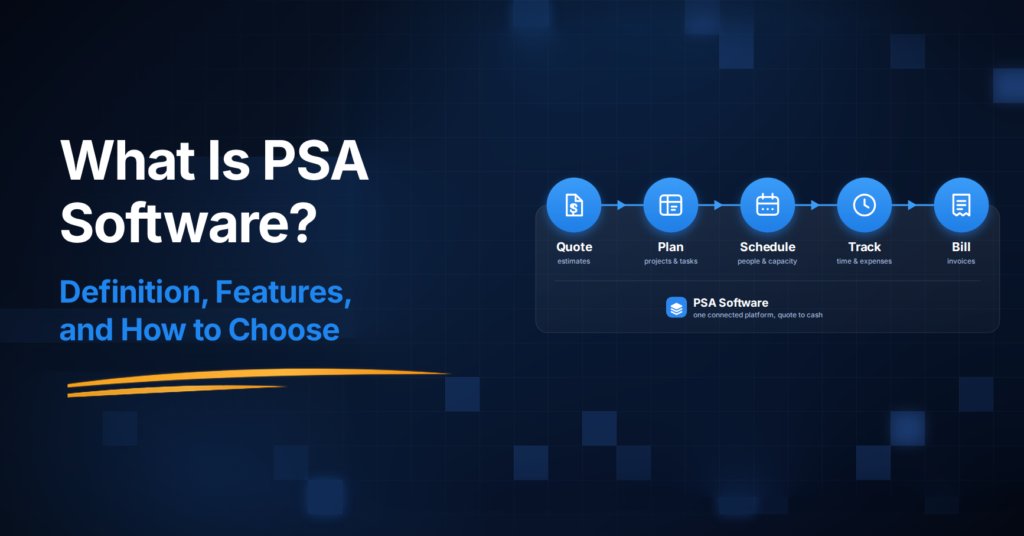
According to TechTarget’s definition, PSA plays a role similar to enterprise resource planning (ERP) products in industries such as manufacturing and retail, giving service businesses the functionality they need to manage core business processes. In practice, an authoritative treatment of what PSA covers spans the full “quote-to-cash” lifecycle. Quote-to-cash (sometimes called “bid-to-bill”) is the end-to-end sequence a services firm goes through with an engagement, from opportunity and proposal, through resource assignment and project execution, to time and expense capture, invoicing, revenue recognition and reporting.
That’s the sequence the platform stitches together.
You’ll see the same category referred to by a few different names. “PSA software,” “professional services automation software,” “PSA tool,” “PSA platform” all point at the same thing. Some vendors and analysts use “services delivery platform” or “professional services platform” for the same concept. What matters is the shape underneath, which is connected data across delivery, people, time and money.
PSA has roots in consulting, legal and accounting firms in the early 2000s. It’s since spread across IT services and software consultancies, data and analytics practices, marketing and creative agencies, engineering and technical services firms, and any other business built around project-based client work.
There’s also a distinct subcategory of PSA built for managed service providers (MSPs), with ticketing, remote monitoring integration and per-endpoint billing baked in. If you’re an MSP evaluating PSA, your shortlist looks different from a consultancy’s shortlist. Everything else in this guide is written for the professional services firm rather than the MSP.
What Does PSA Software Do? The Core Modules
A PSA platform typically brings eight capability areas into one system. Each solves a specific problem in professional services delivery, and the value comes from how they connect. A change in one module updates the others without anyone re-typing data or reconciling spreadsheets.

Quotes and proposals. Turning an opportunity into agreed scope and pricing. A PSA lets a firm build quotes and estimates, send them for client approval, and convert them into projects and invoices without re-entering line items.
Project delivery and collaboration. The plan for the work itself, covering scope, milestones, tasks, dependencies and timelines. This looks like project management, and in the simplest version of a PSA it partly is. The difference is that project data is connected to the financial and resource layers that sit around it.
Resource scheduling and capacity. Planning who does the work. This is where three related-but-distinct concepts live. Capacity is the amount of billable time a firm’s people could theoretically deliver in a period. Allocation is the amount of that capacity assigned to specific projects and clients in advance. Utilisation is the amount actually consumed by billable work. A PSA’s resource scheduling module lets a resource manager see all three together so they don’t discover in April that three project managers each promised the same senior engineer to a different client in March. Capacity forecasting built on the same data lets leadership plan hiring and pipeline commitments weeks ahead rather than in the moment.
Time capture. Where PSA earns its keep on the delivery side. Every time entry a consultant logs into the online timesheet feeds the invoice, the cost calculation, the utilisation report and the margin view from a single source. The system needs to distinguish billable from non-billable time cleanly, because effort matters even where the client isn’t billed by the hour, since firms still need to see the delivery cost behind fixed-fee, retainer and outcome-based engagements.
Expenses. The other half of project cost. Receipts, mileage, subcontractor charges and out-of-pocket costs all captured against the right project through a connected expense management module, categorised, approved and either billed on to the client or absorbed.
Invoicing and billing. Turning delivered work into revenue. A serious PSA supports the range of billing models a modern services firm actually uses, including time-and-materials, fixed-fee, milestone-based, retainer, and outcome-linked pricing. Increasingly, firms mix these on the same account, and the invoicing engine needs to keep the arithmetic honest across all of them.
Reporting and analytics. The layer that tells leadership what’s actually happening. Business reporting covers utilisation by team and role, project margin, work-in-progress or WIP (the value of delivered but not-yet-invoiced work sitting on the books), days sales outstanding or DSO (how long it takes to collect on invoices once they’re issued), forecast versus actual, revenue by client and by engagement type. Customers describe utilisation reporting as the report they check most often, and it’s usually where a new PSA pays back its cost in the first quarter.
Integrations and the connected context. The layer that turns a collection of modules into an operational system rather than another silo. A PSA platform is most useful when its data feeds and is fed by the rest of the firm’s stack, meaning CRM at the top of the funnel, accounting at the bottom, and business intelligence tools reading from the same clean data via native integrations.
Here’s what that looks like in practice.
A European data and BI consultancy operating at enterprise scale uses Avaza as its operational system of record, with APIs and webhooks feeding Snowflake and Power BI for BI, HubSpot as CRM, and DATEV for accounting. The PSA is where the delivery data lives, and the surrounding stack reads from it rather than duplicating it.
That’s the shape of a modern PSA architecture.

Who Uses PSA Software?
PSA software is bought by services firms that have crossed a threshold where scattered tools stop keeping up with the business. In practice, that includes several distinct types of firm.
IT services and software consultancies, where the mix of client engagements, mixed billing models and consultant utilisation is the daily operational problem.
Data, analytics and digital-transformation firms, which increasingly need to feed clean project and utilisation data into their own analytics and AI stacks.
Business and management consultancies, running concurrent engagements across small teams with rolling capacity constraints.
Marketing and creative agencies, particularly full-service agencies that handle retainers alongside project work and need to see profitability per client, not just per project.
Engineering and technical services firms, where long-running projects with complex resource allocation sit alongside utilisation and month-end billing pressure.
Accounting, advisory and financial services practices, and other project-based knowledge services where billable time is the product.
There’s no single “right size” that flips a firm into needing PSA.
The broader product fit runs from about 5 people to 200-plus.
In practice, the strongest signal is operational maturity rather than headcount alone. A six-person consultancy juggling three concurrent clients, two billing models and an accounting integration outgrows spreadsheets faster than a 40-person team wanting a shared task list. The sweet spot for most mid-market PSA platforms is 10 to 100 people; larger firms in the 50-plus range are usually where a PSA delivers the fastest payback because the utilisation and margin gaps get expensive quickly.
Different sectors report different utilisation dynamics, but the overall industry pressure is well documented. According to SPI Research’s 2026 Professional Services Maturity Benchmark, average billable utilisation across professional-services firms fell to 66.4% in 2025, down from 68.9% in 2024, the lowest level in the survey’s history and well below the 75% threshold SPI considers optimal for healthy profitability. That gap is one of the clearest signals a firm can point to when justifying a PSA investment.
The industry is systematically leaving billable capacity on the floor, and disconnected systems make it very hard to see, let alone recover.
Signs You’ve Outgrown Your Current Setup
A services firm typically outgrows a project-plus-spreadsheet stack when several operational signals start showing up at once.
- Exports no longer reconcile.
- Leadership can’t see capacity or margin in one place.
- Billable time leaks before invoicing.
- And month-end billing turns into a multi-day exercise.
When two or three of these are recognisable, a PSA evaluation is worth starting. When most of them are, the case has already made itself. That said, a PSA isn’t the right answer for every services firm, and not every firm needs one yet. Some smaller or simpler practices genuinely run fine on a project management tool, a time-tracking app and an accounting integration. Here’s the pattern the transition typically follows.
Your spreadsheets and disconnected tools no longer reconcile. Someone spends a day at month-end lining up rows across three exports and still finds three different answers for last month’s utilisation.
Leadership cannot see capacity, utilisation or project health in one place. Every question about “how are we tracking” requires assembling a picture from four systems.
Billable time and expenses leak before invoicing. Consultants log time late (or not at all), receipts get missed, and by the time someone invoices the client, the record is already incomplete.
Month-end billing requires excessive manual work. What should take a couple of hours takes a couple of days, because the invoice run depends on approvals, timesheets and expenses that live in different places.
Task-management software gives you delivery status but no commercial context. The project tool says the milestone is green, and the accounting tool eventually says the engagement lost money. Nobody knew until it was too late to change anything.
Project, time and finance records disagree. The delivery director’s spreadsheet, the timesheet app and the accounting system each report a different picture of the same engagement, and nobody trusts any of them fully.
If two or three of these are recognisable, a PSA evaluation is probably worth starting. If most of them are recognisable, the case has already made itself, and the question is which platform, not whether.
PSA vs Project Management vs ERP: Comparison
Project management software coordinates the tasks and timelines of the work, PSA runs the full business of delivering the work, and ERP is the firm’s broader financial and operational backbone. Services firms often confuse the three categories, and the confusion is expensive because the wrong choice tends to become obvious only after implementation.
The table below shows how the three sit next to each other.
| Attribute | Project Management Software | PSA Software | ERP Software |
|---|---|---|---|
| Primary purpose | Coordinate tasks, timelines and dependencies within projects | Run the full delivery-and-financial lifecycle of a services business | Run the firm’s core finance, HR, procurement and enterprise operations |
| Who typically uses it | Project managers, delivery teams | Delivery leaders, resource managers, operations, finance | CFO, finance, HR, IT, executive leadership |
| Time and financial visibility | Task-level effort and progress, no billing context | Project-level margin, utilisation, WIP, DSO, forecast | General ledger, AP/AR, payroll, statutory reporting |
| Resource management | Assignments within one project | Capacity, allocation and utilisation across every engagement | Rarely, usually left to PSA or HR systems |
| Billing model depth | Little to none | Full range including T&M, fixed-fee, retainer, milestone, outcome | Invoice posting, billing rules usually live in PSA |
| Fit for a services firm | The delivery layer, not a system of record for the business | Purpose-built for services firms | Broader, often required alongside PSA in larger firms |
| Typical scale | Small teams to large enterprises | Services firms from ~10 people upward | Mid-market to enterprise, cross-industry |

A project tool tells you a project is behind schedule. A PSA tells you which clients are unprofitable, whose capacity is over-committed for next quarter, and how much of last month’s work is still sitting uninvoiced. That’s the operational and commercial layer that project management software was never built to hold.
Is a PSA an ERP? No. There’s overlap in the financial-reporting area, and some services firms whose finance needs are modest can push their PSA quite far before adding an ERP. But an ERP owns the firm’s official financial record, meaning the general ledger, AP and AR, payroll, tax and statutory compliance. Larger services firms usually run both, with the PSA feeding project cost, revenue and margin data into the ERP for the enterprise-level financial view.
PSA is also sometimes confused with CRM. Customer relationship management software runs the sales pipeline (leads, opportunities, deals and account information) up to the point a client signs. PSA runs everything after that point.
A services firm typically uses CRM to win the work and PSA to deliver it profitably, with the two systems integrated so a closed deal flows into a project without anyone re-keying the account details.
The PSA category itself covers a wide spectrum, and it’s worth being honest about where the lines fall. At the enterprise end sit platforms like Kantata, Certinia (formerly FinancialForce) and Workday PSA, built for global services organisations with hundreds or thousands of billable people, deep revenue-recognition needs and long implementation cycles. At the mid-market end sit lighter, connected platforms serving 10-to-200 person firms that need real operational breadth without the weight of enterprise deployment. Both ends solve different problems. A 60-person consultancy usually doesn’t need the enterprise end, and a 5,000-person global services firm usually can’t run on the mid-market end. Most of the practical PSA decision is picking the right end of the spectrum first, then the right platform within it.
If you’re evaluating platforms for a mid-market services firm, our PSA buyer’s guide goes deeper on the shortlisting mechanics.
How to Choose PSA Software
Choosing PSA well means writing down your own firm’s operational realities first, then scoring every platform on the same short set of questions instead of comparing generic feature lists.
Seven questions tend to matter most.
- Does the platform cover the whole quote-to-cash chain?
- Does it handle your actual mix of billing models?
- Can leadership answer capacity and margin questions from one dataset?
- Can it go live with lower implementation and adoption overhead than heavyweight PSA platforms?
- How does it govern API and AI access?
- Does the pricing model reward adoption?
- Does it fit both the maturity you have today and the maturity you’re moving toward?
The reason the answer isn’t “compare more features” is that most PSA evaluations fail before the first demo, not because the software is bad but because the buying committee walks in with a generic feature checklist and lets whichever vendor demos most cleanly win.
Industry research on this is consistent.
One PSA requirements guide notes that in a discovery-call corpus of 40-plus professional services firms interviewed over 12 months, roughly 60% had already bought and abandoned at least one project management tool, usually one purchased without structured requirements. Teams start evaluating vendors before they understand their own operations well enough to know what they need.
Here’s each of the seven questions in a bit more detail.
- Does it capture the whole quote-to-cash chain, or just tasks and timesheets? A platform that manages projects and time but doesn’t handle quotes, expenses, invoicing and reporting is a PSA in name only, and you’ll bolt those layers on later at higher cost.
- Does it handle the mix of billing models you actually use? Retainer-heavy agencies, fixed-fee consultancies and T&M engineering firms have very different requirements. A platform strong in one billing model and weak in another will quietly cost you margin on the engagements it doesn’t fit.
- Can leadership answer capacity, utilisation and margin questions from one dataset? If the answer requires pulling three exports and reconciling them in a spreadsheet, the PSA hasn’t solved the underlying problem.
- Does the platform deliver operational value with lower implementation and adoption overhead than heavyweight PSA platforms? Enterprise-scale PSA implementations often run six to nine months or longer, while mid-market SaaS PSA tools typically go live in weeks. The gap matters, because the platform only starts paying back when the team actually uses it.
- How does the platform handle the extension layer, meaning connectors, API access, and (increasingly) AI assistants that need governed access to your operational data? This one has moved up the evaluation list quickly. It’s not yet the reason most firms buy PSA, but it’s an increasingly relevant evaluation criterion, particularly for firms already using AI assistants internally or building their own automations.
- Does the pricing model reward operational adoption or penalise growth? Some PSA products price per full user across every role, which quietly discourages the wider adoption (finance access, project collaborators, occasional users) that makes the platform useful. Others price per functional role, which lines up better with how services teams actually work.
- Does it fit the operational maturity you have today AND the maturity you’re moving toward? A platform that fits your current setup exactly but can’t scale as you grow will need replacing in two years. One that requires a level of process discipline you don’t yet have will get abandoned in six months.
Write the answers to these down for your own firm before you look at a single vendor. Then score each platform on the same questions. That single exercise catches most of the bad decisions before they cost you anything.
How Much Does PSA Software Cost?
PSA pricing spans a wide range, because the category itself spans a wide range. At the lightweight end, mid-market SaaS PSA platforms typically list in the range of about $10 to $25 per user per month for entry tiers, rising to $50 to $99 per user per month for advanced tiers.
At the enterprise end (Kantata, Certinia, NetSuite SuiteProjects Pro, Deltek), pricing is usually quote-only and depends heavily on user count, modules and implementation scope.
Subscription cost is usually the smaller part of the total picture.
One PSA requirements guide estimates that mid-market PSA total spend typically lands between roughly $5,000 and $25,000 per year depending on user counts and modules, and that number often understates the true first-year cost because implementation, data migration, internal team time and training rarely appear in a vendor quote.
Enterprise implementations frequently run six months or longer and can require dedicated internal resources for the duration, and even mid-market SaaS implementations usually mean one internal owner running the project alongside their day job for a few weeks.
Some things to watch out for in the pricing model itself.
- Look at what’s included in the base plan versus what’s a paid module.
- Look at whether every user counts the same or whether pricing distinguishes between full users, collaborators, and occasional or guest users.
- Look at whether there’s a minimum seat count that inflates the true entry price.
- Look at how the pricing evolves as you add capacity, because some platforms make the second 50 users much more expensive than the first 50, and others make it much less.
If you’re evaluating Avaza specifically, the plan structure is account-based rather than pure per-user. Each plan includes a set number of users per role, with extra role access as a small per-user add-on, so a firm pays for the roles people actually use rather than a licence for every head.
Full plan detail is on the pricing page, or you can start a free Avaza account and see how the plan structure lines up against a real engagement in your own setup.

An Emerging Consideration: AI-Assisted PSA
As professional-services data becomes more connected, meaning quoting, projects, resources, time, expenses and billing living in one operational system, that same live information can increasingly be accessed through AI assistants. But only when those assistants have sufficient operational context and appropriate controls. AI is therefore worth considering as an emerging extension of PSA, not as a replacement for sound delivery, financial and resource-management processes or human judgement.
Two shifts in the market are worth flagging.
First, connection standards.
The Model Context Protocol (MCP) is an open standard introduced by Anthropic in November 2024 that allows AI applications to connect to external tools and data sources through a shared interface. Since then, adoption has spread across the industry.
Second, the practical implication for services firms is that an AI assistant with access to a firm’s connected operational data can start to answer commercial questions (“what’s our current utilisation?”, “which of last month’s timesheets are still unapproved?”, “what invoices are ready to send?”) without a human first assembling the picture by hand. Today, this is emerging practice, and the reliability and honesty of any AI-assisted operational answer depends entirely on the quality of the underlying data and the controls around what the assistant can do.
For firms exploring AI assistants or building internal automations against their PSA, the harder question is governance. If an assistant can query and update your operational records, what stops it from touching records it shouldn’t?
Avaza provides one example of how this is being handled. MCP access is available across paid plans through the Avaza MCP Server, and every connection operates strictly within the authorising user’s Avaza permissions. Admins can restrict what any connected application (personal access tokens, connected apps or MCP connections) can read, create, update or delete on a per-module and per-user basis through API Permissions, giving firms a governed way to extend their operational system.

That’s the shape of the current state.
As governed agents mature over the next few years, the interesting question won’t be whether AI can help with services operations, it will be what a firm’s operational data and controls actually let it do safely. The buying criterion this is starting to add to PSA evaluations asks how ready a platform’s data and governance model is for the way your firm plans to use AI, whether that’s next quarter or next year.
Frequently Asked Questions
What does PSA stand for?
PSA stands for professional services automation. The term describes a category of business software built for services firms whose product is people’s time and expertise, covering the full quote-to-cash lifecycle from opportunity through delivery to invoicing and reporting.
What’s the difference between PSA and project management software?
Project management software coordinates the tasks, timelines and dependencies within a project. PSA software does that as well, and connects the delivery work to the surrounding layers of resource planning, utilisation, time capture, billing and financial reporting. In practice, a project tool tells you whether the work is on track, while a PSA tells you whether the work is profitable, whose capacity is committed for next quarter, and how much delivered work is still uninvoiced.
Do small firms really need PSA software?
Not always. Some smaller or simpler services practices run fine on a project management tool, a time-tracking app and an accounting integration. The case for PSA sharpens when several signals appear at once, such as spreadsheets that no longer reconcile, leadership that can’t see capacity or margin in one place, billable time that leaks before invoicing, and month-end billing that takes days. Operational maturity is a better indicator than headcount alone.
Can PSA software replace an ERP?
Usually not. PSA and ERP overlap on financial reporting, but they sit at different layers. PSA is built for delivering and pricing project work, while ERP owns the firm’s official financial record, including general ledger, AP and AR, payroll and statutory compliance. Larger services firms typically run both, with PSA feeding project cost, revenue and margin data into the ERP.
How much does PSA software cost?
PSA pricing spans a wide range. Mid-market SaaS PSA platforms typically list around $10 to $25 per user per month for entry tiers and $50 to $99 per user per month for advanced tiers. Enterprise-grade platforms are usually quote-only. Subscription cost is often the smaller part of total spend, and implementation, migration and internal team time usually cost more and take longer than a vendor quote suggests.
Which industries use PSA software?
The primary sectors are IT services and software consultancies, data and analytics practices, management and business consulting, marketing and creative agencies, engineering and technical services firms, accounting and advisory practices, and other project-based knowledge services organisations. Managed service providers (MSPs) form a distinct subcategory with their own PSA products.
Is PSA software cloud-based or on-premise?
Most modern PSA software is cloud-based (SaaS), which reduces the hardware and management burden of an onsite deployment and supports the distributed and mobile workforces that most services firms operate. On-premise PSA still exists in some enterprise contexts, but it’s now the exception rather than the default.
How long does PSA implementation typically take?
Implementation timelines depend heavily on platform scope. Mid-market SaaS PSA platforms typically go live in a few weeks, with one internal owner running the project alongside their day job. Enterprise-grade platforms (Kantata, Certinia, NetSuite SuiteProjects Pro) more commonly take three to nine months, with dedicated internal resources and structured phasing. Rushed implementations tend to be the ones that fail, and adoption almost always matters more than raw speed to go-live.
Starting Point
If your firm has crossed the threshold where the case for PSA has already made itself, the next two steps are choosing the right platform and running a properly scoped implementation. Neither is a small decision, and both benefit from starting with your own operational realities written down rather than opening with vendor demos. Use the seven evaluation questions above as your scorecard, and take every vendor demo through the same set.
Avaza is one of the mid-market PSA platforms built for the 10-to-200 person services firm that needs real operational breadth without enterprise weight. It covers the full quote-to-cash chain (quotes, project delivery, resource scheduling, time capture, expenses, invoicing and reporting in one connected system), handles the mix of billing models most services firms actually use, and includes governed MCP access for firms exploring AI assistants against their operational data.
If that sounds like a possible fit for how your firm runs, there are a few practical ways to go deeper. Read our PSA buyer’s guide for the full evaluation and shortlisting breakdown. Check the pricing plans to see where your team lands. Or start a free Avaza account and try it against a live engagement inside your own setup rather than a scripted demo.
If it would help to walk through your specific stack, delivery model or billing setup with someone who has seen firms like yours implement PSA before, book a call and we’ll take it from there.