
Table of Contents
The Build vs Buy vs Extend Era: How Professional Services Firms Can Innovate Without Rebuilding Their Operational Core
Build means creating a custom system from scratch. Buy means adopting an established SaaS platform. Extend means keeping a dependable platform and layering custom interfaces, workflows and AI on top through APIs, webhooks or Model Context Protocol connections. For most professional-services firms in 2026, the strongest model is to buy or retain the connected operational foundation, extend it where flexibility is needed, and build only where genuine competitive advantage lives.
Key Takeaways
- The traditional Build-versus-Buy binary no longer fits how professional-services firms decide. There are three legitimate paths in 2026, not two.
- AI-assisted development has cut the cost of creating software. It has not cut the cost of operating a dependable business platform for years.
- Professional-services software is a connected operating chain (customer, quote, project, people, schedule, time, expenses, invoice, reporting), not a task tool. Rebuilding it is far harder than rebuilding a single-purpose app.
- The real total cost of AI-enabled software sits in four buckets, spanning direct consumption, reliability overhead, organisational overhead, and opportunity cost. The sticker price is often only 35% to 50% of the first-year total.
- The strongest model for most firms is “stable core, flexible edge”. Buy or retain the operational core, extend it through open access, and build only where genuine competitive advantage lives.
AI has already changed how people research, analyse, write, code and perform everyday work. It’s now changing how companies create the software they run on. A dashboard that used to need a sprint can ship in an afternoon. A workflow that used to sit in a project backlog can be prototyped in a lunch break. The result is that one of the oldest decisions in business software, whether to build a custom system or buy an established one, has been quietly disrupted.
For years the choice was framed as Build versus Buy. A company either purchased an established platform and adapted its processes to it, or accepted the time, cost and specialist effort of developing its own.
Professional-services firms can now do something in between.
They can retain a dependable operational platform while selectively building the interfaces, agents, reports and workflows that make their business distinctive. The real question is no longer whether to build or buy. It’s what to buy, what to extend and what is strategically worth owning.
AI has lowered the cost of creating software. It has not removed the cost and complexity of operating it.
Professional-services software is a specific kind of software, not a task board or a set of isolated tools stitched together. It’s the connected chain that moves a client engagement through your business, from customer and quote through project, people, schedule, time, expenses, invoice and reporting. This category has a name, Professional Services Automation (PSA), and if you run a services firm the PSA layer is the operational system of record every stack decision hinges on. That’s how the rest of this piece treats it.
What “Build,” “Buy” and “Extend” Actually Mean in 2026
Each path defines a distinct commitment.
- Buy adopts an established SaaS platform and adapts your processes to it.
- Build creates a custom system from scratch that your team owns and maintains.
- Extend keeps a dependable platform and layers custom interfaces, workflows and AI on top through its integration surface.
Each has shifted in the last two years, and the words are the same while the substance underneath them is not.
Buy
Buy means adopting an established SaaS platform, configuring it, and adapting your processes to fit. In professional services, that usually means a PSA product that already models the operating chain (customers, projects, resources, time, expenses, billing, reporting) so you don’t have to. You pay a subscription, an implementation and training cost, integration work to plug it into the rest of your stack, and (increasingly) additional cost for premium AI or connector access. The vendor carries most of the platform-maintenance burden.
Build
Build means creating a custom system from scratch, or close to it. Your team owns the data model, the workflows, the security, and the long-term evolution. AI-assisted development has meaningfully cut the effort of the first version, particularly for internal dashboards, integration glue and prototypes. It hasn’t cut the effort of running a dependable business platform for years afterwards, which is a different problem with different economics.
Extend
Extend means keeping a dependable platform and layering custom capability on top through its APIs, webhooks and (increasingly) Model Context Protocol (MCP) connections. You don’t rebuild projects, schedules, time and billing. You build the specialised interface, workflow or agent your business genuinely differentiates on, and let the platform beneath do what it already does well. Depending on the platform, this can be as light as connecting AI assistants through a managed MCP path or as deliberate as building a custom internal application. What’s changed most in 2026 is that AI-assisted development, plus more mature integration standards, have made this path plausible in cases where it wasn’t before.
What AI Has Genuinely Changed (and What It Hasn’t)
AI-assisted development has meaningfully cut the effort of creating first-version software, whether that’s prototypes, internal dashboards, integration glue, small tools or single-purpose agents. It has not cut the effort of operating a dependable business platform over years, which is a different problem with different economics.
That distinction matters for every Build, Buy or Extend decision you’ll make.
AI-assisted development reduces the effort involved in proof-of-concept creation, interface development, workflow scripting, basic integrations, report and dashboard generation, database queries, documentation, code review, testing assistance and translating business requirements into working prototypes.
If your firm has strong technical or domain leadership, some historical arguments against custom software (too slow, too expensive, too specialist) are becoming outdated for a specific slice of software.
But it’s important to separate two things that are often collapsed together. There’s creating a convincing first version. And there’s owning a dependable operational platform for years.
The first version is where AI helps most dramatically. A prototype that used to take a quarter can now ship in days. The second is where AI helps least. AI coding assistance does not automatically give you a durable data model, secure permissions, reliable billing logic, migration and reconciliation, performance and uptime, user support, documentation, continuity, or long-term maintenance. Those still cost time and money and organisational attention. Mainstream 2026 build-vs-buy commentary broadly agrees on this pattern, from Zylo’s July 2026 analysis to AppDirect’s coverage of AI-enabled development. AI has shifted the economics for a narrow set of build cases and left the operating economics of a durable business platform largely unchanged.
That distinction is where the Extend path gets its energy. If AI mostly changes first-version economics, then the biggest gains come from putting AI-assisted work into layers where a first version is what you actually need (a new report, a new interface, a small agent) rather than into layers where a durable platform is what you actually need.
The Three-Layer Operating Model
A professional-services software stack has three distinct layers.
- First, an operational system of record at the base.
- Second, an intelligence and automation layer above it.
- Third, specialised interfaces and workflows on top.
Each layer has different economics, different failure modes, and calls for a different Build, Buy or Extend answer. Deciding which layer is failing you is the first move before deciding what to do about it.
Layer 1 · The Operational System of Record
This is where the durable, interconnected business record lives, including customers and contacts, quotes and commercial arrangements, projects and budgets, employees and contractors, resource schedules and availability, rates and costs, billable and non-billable time, expenses and receipts, approval states, retainers and recurring work, invoices and payments, permissions and reporting history. Its priorities are accuracy, continuity, security, data integrity, consistent commercial logic and dependable reporting. Fragility at this layer breaks everything above it.
A professional-services operating platform carries a much greater implementation burden than a task-management system. A task tool needs to understand work items, owners, deadlines, status and comments. A PSA platform also has to understand how projects, people, capacity, time, costs, approvals and billing affect one another. Get one relationship wrong and the effects ripple downstream.
Layer 2 · The Intelligence and Automation Layer
This layer interprets operational information and assists with workflows. It might include AI assistants connecting through MCP, language models, agents, business-intelligence tools, automation platforms and custom scripts. What it does looks like identifying missing timesheets, preparing project-status reports, reviewing capacity, finding billing exceptions, summarising recent changes, surfacing operational risks, answering questions conversationally, or preparing actions for approval.
This is where the AI conversation lives. It’s worth noticing, though, that this layer only becomes reliable when the operational system of record beneath it is complete and consistent. An AI assistant can’t reliably reason about utilisation, capacity, billing delays or project margin from a fragmented dataset, or from a to-do list alone. AI becomes more valuable when it can work across connected operational context.
Layer 3 · The Interface and Specialised Workflow Layer
This is where individual organisations can differentiate, through custom dashboards, internal management tools, conversational interfaces, specialised approval processes, client-specific reporting, workflow-specific mini-apps, business-specific automations and custom employee experiences.
Layer 3 is where AI-assisted development gives you the most obvious leverage right now. A better interface for how your project managers actually work. A report your finance lead can trust. An internal tool for a workflow that’s genuinely yours.
The Diagnostic Question
Before deciding whether to build, buy or extend, ask a different question first. Which layer is actually failing you?
A frustrating interface, a missing report or a repetitive process doesn’t automatically justify rebuilding the operational record beneath it. If Layer 3 is broken, fix Layer 3. If Layer 2 is broken, work on Layer 2. Rebuilding Layer 1 because Layer 3 is annoying is one of the more expensive mistakes a services firm can make.
Why PSA Is Harder to Rebuild Than a Task Tool
A PSA platform is harder to rebuild than a task tool because its modules affect one another. Schedules influence capacity forecasts. Time affects budgets and invoicing. Rates affect revenue and margin. Approvals affect billing readiness. Permissions control commercial data. Getting one relationship wrong sends errors downstream through every other module. A task tool models work items and status. A PSA platform models the whole operating chain.Concretely, that means resource scheduling needs to talk to timesheets, which need to talk to expenses, which need to talk to reporting and to the billing engine. The challenge isn’t only developing each function. It’s maintaining the relationships between them as the company grows, employees change, customers require different arrangements, pricing models evolve, integrations shift, and financial and regulatory requirements develop. That’s a decade-plus of platform ownership, not a first release.
That’s the honest reason PSA is harder to rebuild than most software categories. It isn’t the case, though, that no one should ever build. Some organisations rationally do.
Consider one anonymised story from the field. A large and technically capable professional-services organisation decided to consolidate its operational systems into an internally owned platform. Its existing SaaS platform hadn’t failed. Subscription price wasn’t the main issue. What the organisation wanted was ownership of data and architecture, fewer duplicate systems, removal of integration workarounds, workflows tailored precisely to its operations, and faster delivery of company-specific requirements. AI-assisted development helped make the project more commercially plausible.
However, that organisation also accepted responsibility for architecture, data migration, permissions, billing logic, testing, infrastructure, support, maintenance, future integrations and long-term ownership. This is a credible Build case because the firm has unusual scale, technical capability and operational requirements. It shouldn’t be presented as the default answer for every professional-services firm. Most services firms don’t have permanent platform-engineering capacity, and the moment that capacity leaves the platform starts drifting toward liability.
The New Risk · Automation and Application Sprawl
Automation and application sprawl happens when AI-assisted development lets every team build its own agents, workflows and integrations, and each one becomes its own source of truth, permission model and operational database. The result is duplicated logic, scattered credentials, unclear ownership and rising governance load.
For professional-services firms, whose commercial data is deeply interconnected, sprawl doesn’t just create IT clutter. It causes billing leaks, capacity blind spots and margin surprises at month-end.
AI-assisted creation lets many more teams build their own agents, workflows, reports, internal applications, integrations and data pipelines. That’s a genuine democratisation of software creation. It also creates a set of new operational problems that used to belong to enterprise IT and now belong to everyone.
- Duplicated automations
- Conflicting business logic
- Scattered credentials
- Inconsistent permissions
- Multiple versions of the same data
- Unclear ownership
- Undocumented dependencies
- Abandoned workflows when employees leave
- Difficulty attributing operating costs
Professional-services firms are particularly exposed because their operational and commercial data is deeply interconnected. A small inconsistency can become a resource conflict, an inaccurate capacity forecast, a missed timesheet, an unapproved expense, delayed billing, or a margin leak.
This isn’t hypothetical.
It’s how a services business’s month-end goes sideways in practice.
The scale of the shift is now measurable at the CIO level. A Dataiku/Harris Poll survey of 600 enterprise CIOs, published in May 2026, found that 82% agree employees are creating AI agents and apps faster than IT can govern them. More than half (54%) had already discovered unsanctioned AI use for work tasks or projects. And 89% expected broader employee access to AI tools without strong governance to produce significant technical debt from shadow AI.
TechTarget Senior Executive Editor James Alan Miller framed the practical consequence in a June 2026 analysis. Once business users can build tools that touch customer data, employee records or operational systems, the enterprise has to be able to answer four things about each one. What data can it access? What can it change? Who owns it? When does it come up for review? Fail those, and citizen innovation quietly becomes a new form of shadow IT. Bishop Fox reported a parallel dynamic in its 2026 enterprise AI ownership analysis, noting that consumption grows invisibly in the background as automation removes friction, while multiple teams rely on the same services without shared visibility into cumulative usage.
The answer isn’t to stop teams from building. It’s to avoid letting each automation become its own source of truth, its own permission model, its own commercial rulebook, its own operational database. As software creation becomes decentralised, companies need stronger central ownership of data and controls.
The easier it becomes to build an automation, the more important it becomes to govern what gets built.
The Hidden AI Operating Bill
The hidden AI operating bill is what a business process built on AI costs to run across every employee, project and billing cycle for three years, not the initial design cost. It sits in four buckets, running from what tokens themselves cost through to the human overhead of running the whole thing safely. Industry practitioners report that the software licence typically accounts for only 35% to 50% of first-year total cost.
Most build-vs-buy discussions miss this in 2026 because they’re still framing the question around initial cost. The interesting question isn’t how much a build costs to design. It’s what a business process built on AI costs to run for three years.
This isn’t fear about token prices. Model costs may fall. Smaller or local models may become practical. Individual AI calls will get cheaper. The strategic issue is expanding usage and difficult cost attribution. As AI becomes easier to deploy, more employees use it. More workflows run continuously. Prompts include more context. Agents make several calls to complete one task. Unsuccessful actions retry. Multiple models get used for routing, reasoning and validation. Monitoring and storage costs accumulate.
The real total-cost picture has four buckets.
- Direct consumption. Model tokens and inference, embeddings and retrieval, document/image/audio processing, API and connector charges, automation-platform usage, hosting and databases.
- Reliability overhead. Validation calls, retries and fallbacks, human review, logs and monitoring, testing after model or integration changes.
- Organisational overhead. Workflow ownership, permission administration, incident response, documentation, employee support and training, duplicated workflows created by separate teams.
- Opportunity cost. Engineering time diverted from client work or differentiation, operations and finance time spent reconciling outputs, dependence on employees who understand the internal system, continuity risk when the original builder leaves.
Industry analyses of enterprise AI reflect this pattern.
For AI automation deployments, industry practitioners report that the software licence typically accounts for only about 35% to 50% of first-year total cost, with the rest sitting in implementation, integration, human review and organisational change management categories that don’t appear on vendor price lists.
A 2026 analysis by Xenoss reported that 85% of organisations misestimate AI project costs by more than 10%. Cohere makes the underlying point cleanly. A single user request can trigger a long prompt, a large context window, multiple reasoning steps, several tool calls and a polished answer. The user experiences one interaction while the company pays for the entire chain.
The meaningful calculation isn’t how much one AI call costs. It’s what a business process built on AI costs to run across every employee, project, client and billing cycle for three years.
Consider a concrete example.
A small AI and data consultancy wanted its preferred AI tools to access its project and operational data. A competing vendor placed the required AI and MCP connectivity behind a significantly more expensive tier, adding roughly US$10,000 annually. The firm considered building its own project-management system, then reopened its evaluation of an alternative platform when MCP access became available on standard paid plans. The lesson is that software economics now include SaaS subscriptions, premium AI tiers, connector access, model usage, custom development, integration maintenance, infrastructure, governance and human supervision. Any of those buckets can dominate a decision that used to be about sticker price.
AI can reduce development effort without removing software ownership.
The Build, Buy or Extend Decision Framework
The Build, Buy or Extend framework works this way.
- Buy or retain a platform when the operational core already works and missing capabilities aren’t strategically differentiating.
- Extend when the operational core is sound but the business needs custom interfaces, agents or workflows at the edges.
- Build only where the process is genuinely proprietary, permanent engineering ownership exists, and the three-year economics stand up.
None of the three is universally correct. The right answer depends on which layer is failing you, what your engineering capacity actually is, and where your genuine differentiation lives.
| Option | When it’s the right call | What you pay for | What the vendor or you carry | Common misfires |
|---|---|---|---|---|
| Buy or retain | The platform already supports the core operational workflows. Missing capabilities aren’t strategically differentiating. The main problem is configuration, process design or adoption. The vendor provides sufficient openness for what comes next. | Subscription. Implementation. Training. Integrations. Possibly premium AI or connector access. | The vendor carries platform maintenance, security, uptime, most integration upkeep and ongoing product development. | Buying to fix an adoption or process problem. Missing the role-based cost of the plan in your monthly budgeting. Picking on features rather than on operating-chain fit. |
| Extend | The operational record is sound. You need custom interfaces, reports, agents or workflows. APIs, webhooks or MCP provide adequate access. Differentiated value sits above the operational core. You want flexibility without owning every system function. | SaaS subscription. Selective development. Model and automation usage. Integrations. Governance. Maintenance of the custom layer only. | The vendor carries the platform and its integrations. You carry the custom layer’s maintenance, monitoring, permission design and continuity. | Building a shadow system of record inside the extension layer. Letting each extension become its own permission model. Underestimating the operating cost of the automations you build. Treating low-code platforms as if their operating cost is zero. |
| Build | The process is genuinely proprietary. Existing systems create severe compromise. You have permanent engineering ownership. Requirements are stable and well understood. You’re prepared to own support and continuity. The long-term economics remain compelling. | Development. Data modelling. Migration. Infrastructure. Security. Testing. Integrations. Model usage. Maintenance. User support. Documentation. Continuity and staffing. | You carry everything. Architecture, permissions, migration, billing logic, testing, infrastructure, support, maintenance, future integrations, long-term ownership. AI cuts the development line. It doesn’t erase the rest. | Confusing “can build” with “should build”. Scoping to the first version rather than to the three-year platform. Assuming AI-assisted development eliminates the operating economics. Losing the person who built it and inheriting a stranded asset. |
Extend isn’t automatically the correct answer. It becomes attractive where the operational core is reliable but the business requires more flexibility at the interface, workflow or intelligence layer. Where the core itself is genuinely broken, extending it just adds a layer of workarounds on top of the problem.
Test Extend Before Replacing the Core
Before you replace an established operational platform, run a real hypothesis test. The point is to find out whether you need a new operational platform, or a better way to work with the platform you already have. Those aren’t the same question and they lead to different answers.
The method has ten steps.
- Document the workflows that are genuinely missing, not just annoying.
- Separate interface frustrations from data-model limitations. Interface problems are cheap to fix. Data-model problems are expensive.
- Identify configuration, process and adoption problems that look like software problems but aren’t.
- Test whether APIs, webhooks, MCP or custom interfaces can close the gap.
- Build one custom workflow against a limited dataset, in the extension layer, before touching anything else.
- Test user permissions and human-approval boundaries on that workflow.
- Calculate three-year ownership cost, not prototype cost.
- Define export, rollback and continuity plans, and answer honestly what happens if the experiment fails or the builder leaves.
- Compare the extension result with the full replacement option honestly.
- Migrate one workflow before migrating the operating system.
You’re testing a more useful hypothesis than “should we build or buy”. Do we need a custom operational platform, or a better way to work with the platform we already have?
Running the test well is easier with a live environment to try it in. Sign up for Avaza’s free plan and get set up in about five minutes to try the extend model against your own work. Start free →
Governance Becomes More Important When Software Can Act
Permissions used to be a display question. They’re now a business-critical control.
When software only displays information, poor access design is a risk to information hygiene. When an agent or automation can create, update or delete operational and financial records on someone’s behalf, it becomes a risk to the business itself. That shift is why the governance conversation has moved out of IT and into the operating committee.
For any AI tool, agent or integration touching your operating stack, here are the questions worth answering up front.
- Can the tool only read information, or can it act?
- Which modules can it access?
- Can it create, update or delete records?
- Does it inherit an employee’s existing permissions, or operate under separate ones?
- Can sensitive actions be blocked centrally?
- Where should human review be required, and how?
- Are deletion limits available and configured?
- Who owns the workflow?
- How is access revoked?
- What happens when the builder leaves?
- How is unexpected behaviour investigated?
A brief technical aside is worth having here.
Model Context Protocol (MCP) is an open standard, published by Anthropic, that lets AI applications like Claude and ChatGPT connect to external systems (data sources, tools, workflows) through a standardised interface. It’s supported across a broad and growing set of AI clients, and an increasing list of enterprise platforms shipped their own MCP servers through 2025 and 2026. For a business audience, the useful shorthand is that MCP is the connection layer that lets an AI assistant do real work in your operational systems. It isn’t the product. It’s the door. What matters is what’s behind the door and who’s allowed to open which parts of it.
An AI-ready operational platform needs both connected context and explicit boundaries.
Stable Core, Flexible Edge
Stable core, flexible edge is the operating model where a dependable operational platform owns the durable business record, and specialised interfaces, agents and automations live in a lighter, customisable layer above it. MCP, APIs and webhooks connect the two layers without letting them collapse into one another. For most professional-services firms in 2026, this is the defining future model.
The stable operational core owns customer and project records, schedules and availability, time and expenses, rates and budgets, billing information, approval states, permissions and reporting continuity. The flexible edge may contain AI assistants, conversational interfaces, project summaries, exception alerts, specialised workflows, approval preparation, internal tools, customer-specific reports and workflow mini-apps.
The proposition here isn’t “never build.” Build where your advantage lives. Avoid rebuilding operational rails solely because the interface or automation layer has changed.
Touchstone Consultancy is a small, useful illustration of the pattern. A 2-to-10 person management-consulting and project-delivery firm based in Auckland, working across New Zealand and Australia, they spent nearly two years evaluating more than two dozen platforms before settling. What’s telling is what they kept. Dext stayed in place for non-project expense capture because its OCR and Xero integration worked well. Xero stayed in place for accounting. What changed was the middle layer. Proposals, projects, time, expenses and invoicing consolidated into one connected platform, with a Dext-to-Avaza-to-Xero workflow bridging what they’d kept. Their director Robert Maszkowski described the goal as being able to see how the financials stack up within running projects and track daily progress on the go, without changing the tools that already worked around the edges. That’s the extend pattern in practice.
The principle scales up too.
Mainstream 2026 commentary is converging on a similar framing (Splunk and others describe the pattern as “buy for parity, build for competitive advantage”). What we’d add for professional services is that the “core” isn’t a commodity. It’s the connected operating chain of customer, quote, project, people, schedule, time, expenses, invoice and reporting. Rebuilding that just to enable a new capability at the edge is a disproportionate response to what’s usually an edge-layer problem.
The AI-Ready Operations Maturity Model
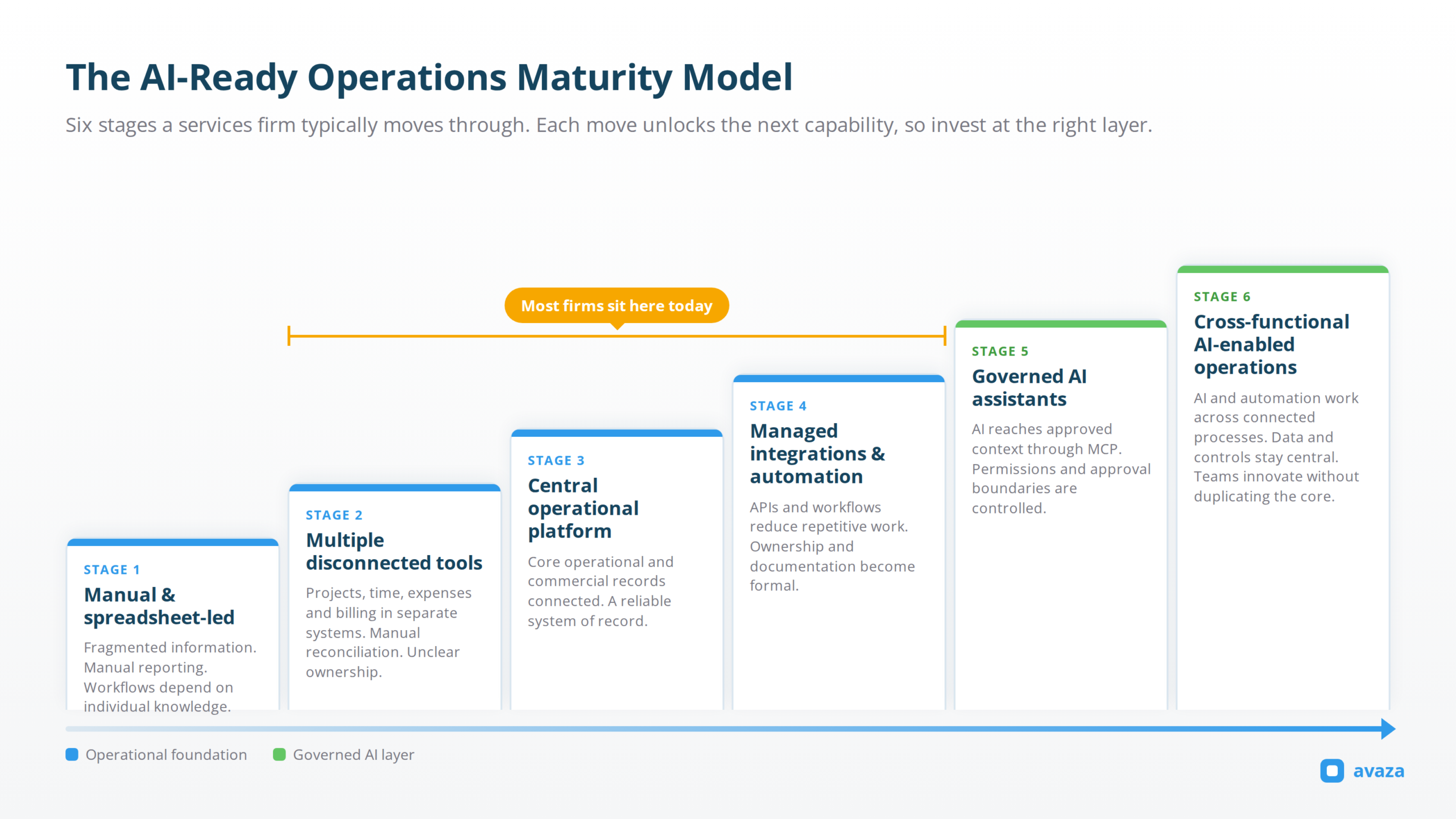
The AI-Ready Operations Maturity Model describes six stages a services firm typically progresses through, from manual and spreadsheet-led (Stage 1) to cross-functional AI-enabled operations (Stage 6). Most firms today sit somewhere between Stages 2 and 4. The value of naming the stages is that it tells you which move actually unlocks the next capability, so you invest at the right layer rather than jumping levels.
Where does your firm sit today? Here’s a practical six-stage view.
- Stage 1 · Manual and spreadsheet-led. Information is fragmented. Reporting is manual. Workflows depend on individual knowledge.
- Stage 2 · Multiple disconnected tools. Projects, time, expenses and billing live in separate systems. Reconciliation is manual. Ownership is unclear.
- Stage 3 · Central operational platform. Core operational and commercial records are connected. The firm has a reliable system of record.
- Stage 4 · Managed integrations and automation. APIs and workflows reduce repetitive work. Ownership and documentation become more formal.
- Stage 5 · Governed AI assistants. AI can access approved operational context through connections like MCP. Permissions and approval boundaries are controlled. Assistants support defined workflows.
- Stage 6 · Cross-functional AI-enabled operations. AI and automation work across connected processes. Operational data and commercial controls remain centralised. Teams innovate without duplicating the core.
For a concrete example of what Stages 4 and 5 look like at enterprise scale, INFORM DataLab, a 50-plus person German data-and-IT professional-services firm, runs Avaza as its PSA for quoting, projects, scheduling, time tracking and invoicing, and uses Avaza’s APIs and webhooks to feed clean operational data into a Snowflake data warehouse, where it’s modelled in Qlik and Power BI alongside HubSpot (their CRM) and DATEV (accounting). The Avaza team extended the platform at the API and event layers specifically for INFORM, expanding webhook coverage for lifecycle events like recurring invoices, deletes and schedule series, so the downstream pipelines could stay accurate. Avaza acts as the system of record. The BI stack sits above. The CRM and accounting integrate cleanly. As their Gerrit Bury describes it, tracking and billing time is where the business makes money, and having consultants track time easily while pushing clean data through the API to the warehouse is what makes the modelling possible.
That isn’t a hypothetical architecture. It’s the three-layer operating model made real. A stable operational core, a flexible intelligence layer built on top, and specialised interfaces added where they earn their keep.
How Pricing Model Shifts Interact with Operational Data
Pricing model shifts (fixed-fee, retainer, outcome-based, usage-linked) don’t remove the need for operational data underneath. They separate how the client is charged from what the firm needs to know internally to deliver profitably. Even outcome-based work requires internal visibility into effort, capacity, cost and margin. If anything, moving away from time-and-materials makes the operational data more important, not less.
Professional-services pricing has become more varied. Firms mix time and materials, fixed fees, retainers, milestones, prepaid work, usage-linked and outcome-linked pricing. That’s largely a good development. It also creates a common confusion.
There’s a difference between how the client is charged and how the firm measures the effort, cost and capacity required to deliver the work.
Even where clients don’t pay by the hour, firms still need visibility into delivery effort, resource consumption, scope growth, project cost, utilisation, margin and repeatability. Outcome-based pricing doesn’t eliminate the need for operational data. It increases the importance of knowing what it costs to deliver the promised outcome.
If your billing model is shifting away from time and materials, that’s a strategic move, and it strengthens rather than weakens the case for a connected operational system underneath. Someone still has to answer whether you made money on that engagement. It just isn’t the client. Even work that a client never sees an hourly rate for still needs to move cleanly from delivery into invoicing, and cleanly from invoicing into reporting.
What Is an Operational System of Record?
An operational system of record is the software layer that holds the durable, authoritative business data your day-to-day operations depend on. For a professional-services firm, that includes customers, projects, resource schedules, time, expenses, rates, invoices, payments and permissions.
It’s the layer other systems (BI, AI, CRM, accounting) treat as the source of truth.
The term “system of record” was popularised by technology analyst Geoffrey Moore, who distinguished this durable transactional layer from other systems that use its data (systems of engagement, systems of intelligence). The distinction matters more, not less, in the AI era, because AI tools are only as reliable as the operational data they can read.
A useful AI assistant needs to know who the customer is, what was agreed, how the project is structured, who’s scheduled, who has capacity, what time has been logged, what’s billable, what expenses were incurred, what’s outstanding, and what’s been invoiced. If your operational system of record is fragmented across five tools, the AI layer inherits the fragmentation.
Does MCP Replace an API?
No. Model Context Protocol (MCP) is a connection layer that sits on top of existing APIs. It doesn’t replace them. It standardises how AI assistants like Claude and ChatGPT discover and use them.
An API is the underlying interface a system exposes so other software can read or write data. MCP is a standard way for an AI application to say “here are the tools I can call, here’s what they do, here’s how to authenticate.” Behind that surface, the actual read and write operations still go through the platform’s API. For a business team, the practical implication is that MCP makes an AI assistant more capable of using systems you already run, without every vendor building a bespoke integration for every AI client. It doesn’t replace your API. It gives an AI assistant a common language for talking to it.
Where Avaza Fits? A Connected PSA Platform Designed to Be Extended
Avaza is a connected PSA platform that supplies the stable operational core (customers, quotes, projects, people, schedules, time, expenses, invoices and reporting) plus the MCP Server, API Permissions and integration surface that let teams build the flexible AI-and-workflow edge on top. It’s designed to be the stable core in the stable-core-flexible-edge model this article recommends, not the whole software stack.
Today, more than 60,000 businesses across 150+ countries use it to run the operating chain end to end.
For teams building the flexible edge, Avaza’s MCP Server is live at mcp.avaza.com/mcp, with a custom MCP connection for compatible ChatGPT and Claude environments. Connections use OAuth and operate under the authorising Avaza user’s permissions, so an AI assistant connected through MCP cannot exceed the permissions that user already has.
Today, compatible assistants can query projects, tasks, schedules, timesheets, expenses, estimates, invoices, approvals and payments; they can create, update and delete records (including scheduling records) within the user’s role and any API Permissions restrictions; they can approve or reject timesheets and submit expenses for approval; and they can create payments and apply them to invoices. Governed action, not merely conversational reporting. As governed agents mature, the same operational context becomes progressively more useful for the AI workflows your team chooses to build.
Around that connection, Avaza’s API Permissions act as the governance layer for personal access tokens, connected applications and MCP access from one admin surface. Admins can control Read, Create, Update and Delete access by module across 11 API modules, set actions to follow existing role permissions or restrict them to admins or block them entirely, apply stricter controls per user, or block all API access for a specific user. Admins can also set a cap on API deletions per user per hour to contain bulk-delete damage from runaway scripts or agents. That cap ships disabled, so turning it on is part of setup. API Permission changes are logged and can be exported to CSV, and connected tools operate under identifiable user permissions.
That’s the architecture beneath the AI story. Avaza’s position isn’t that it’s the best AI platform. It’s that it supplies the connected operational context and the controls that make external AI assistants useful and safe on services-firm data.
Bring the AI you prefer. Avaza supplies the connected professional-services context.
Build the Workflows That Make Your Business Different
If the framework in this article resonated, if you’re running the operating chain across projects, resources, time, expenses and billing and looking for a platform that stays out of the way where it can and opens up where you need it to, the fastest way to evaluate is with your own work in front of you.
Build the workflows that make your business different. Keep the operational foundation beneath them connected and governed.
Explore how Avaza connects projects, resources, time, expenses and billing, with APIs, MCP and governed access for the AI tools and custom workflows your business chooses to use.
Two ways to start.
- See it with your own work. The free plan gets you inside the platform in about five minutes, no credit card. Set up a project, connect an AI assistant through MCP, and see whether the connected operating chain fits how your firm actually runs. Paid plans include set numbers of users per role, with per-user add-ons for additional access, so you pay for the roles people actually use rather than a licence for every head. Start a free Avaza account →
- Talk it through first. If you’d rather walk through the fit with someone who can pick the questions that matter most for a firm your size (billing model, resource shape, extension goals, AI-access posture), book a short call. Book a call →
Trusted by more than 60,000 professional-services and client-focused businesses in 150+ countries. Read how Touchstone in Auckland runs the extended pattern in a 2-to-10 person consultancy, or how INFORM DataLab in Germany does it at a 50-plus person enterprise scale.

Frequently Asked Questions
What Is the Difference Between Build, Buy and Extend?
Build means creating a custom system from scratch that your team owns and maintains. Buy means adopting an established SaaS platform and configuring it to your workflows. Extend means keeping a dependable platform and adding custom interfaces, workflows or AI agents through its APIs, webhooks or MCP connection. For most professional-services firms in 2026, some combination of Buy for the operational core and Extend for the differentiating layer is the strongest model.
Has AI Made Custom Software Cheaper Than SaaS?
For a narrow set of use cases, yes. AI-assisted coding has meaningfully cut the effort of prototypes, internal dashboards, small integrations and single-purpose tools. For running a dependable business platform over years, covering a durable data model, secure permissions, reliable billing logic, ongoing support, integrations and migration, the operating cost hasn’t fallen much. AI helps most with first versions and least with long-term ownership, so the honest answer depends on whether the software you’re comparing is a first version or a durable platform.
When Should a Professional-Services Firm Build Its Own PSA?
Building a PSA can be rational when the firm has unusual scale and technical capability, permanent engineering ownership, genuinely proprietary processes, well-understood requirements, existing platforms that create severe compromise, and a long-term commitment to owning support and continuity. Building isn’t rational because the current tool is annoying, the interface feels dated, or AI made a prototype look cheap. Those are edge-layer problems and cost far less to fix at the edge layer.
What Does It Mean to Extend a SaaS Platform?
Extending means keeping the platform’s data model, workflows and controls, and building custom capability on top through the platform’s integration surface. That surface is typically some combination of APIs, webhooks and (increasingly) an MCP connection for AI assistants. What you build on top might be a custom view or dashboard, an internal tool for a specialised workflow, an AI agent that runs against your operational data, or an integration with a system the platform doesn’t cover natively. The platform stays the source of truth. You own the differentiated layer.
What Is an Operational System of Record?
An operational system of record is the software layer that holds the durable, authoritative business data your day-to-day operations depend on. For a services firm, that’s the connected chain of customers, projects, resource schedules, time, expenses, rates, invoices and permissions. Other systems (BI, AI, CRM, accounting) rely on it as the source of truth. If it’s fragmented across five tools, everything above it inherits the fragmentation.
Does MCP Replace an API?
No. Model Context Protocol (MCP) is a connection layer that sits on top of existing APIs. It gives AI assistants like Claude and ChatGPT a standard way to discover and use tools the platform exposes, so vendors don’t have to build a bespoke integration for every AI client. Behind the MCP surface, the actual operations still go through the platform’s API. MCP standardises how AI applications connect. APIs are what they connect to.
What Costs Should Be Included in an AI Software Project?
Four categories, not the sticker price alone. Direct consumption includes model tokens, embeddings, document and image processing, connector charges, hosting and databases. Reliability overhead includes validation calls, retries, human review, logs, monitoring and testing after changes. Organisational overhead includes workflow ownership, permission administration, documentation, employee support and duplicated workflows built by different teams. Opportunity cost includes engineering time diverted from client work, operations reconciling outputs, and dependence on the person who understands the internal system. Industry practitioners report the software licence is often only 35% to 50% of first-year total cost.
How Can Companies Prevent Automation Sprawl?
Central control of data and permissions, not central control of who can build. Let teams create workflows and agents, but require them to run against a shared source of truth for operational and commercial data, and against a shared permission model. Register every automation with an owner and a documented purpose. Set access boundaries centrally through an API-permissions layer rather than case by case. Assume the person who built the automation will eventually leave, and design so the workflow doesn’t collapse when they do.
What Permissions Should AI Agents Have?
The minimum needed to do the job, and no more. Ask whether the agent can only read information or can also act, which modules and record types it needs, whether it should be allowed to create, update or delete records, whether it should inherit an individual user’s permissions or operate under a scoped account, where a human should be required in the loop, and how quickly access can be revoked. For agents running against a PSA or operational system, use the platform’s own permission model rather than layering a bespoke one on top of it.
Does Outcome-Based Pricing Make Time Tracking Unnecessary?
No. Outcome-based pricing changes how the client is charged. It doesn’t change what the firm needs to know internally to run the business. Even if a client isn’t paying by the hour, someone still has to understand delivery effort, resource consumption, project cost, utilisation and margin. If anything, outcome-based work makes internal effort data more important, because there’s no external number telling you whether you’ve priced correctly. You have to be able to answer that from your own data.
The Bigger Point
The Build-versus-Buy debate is no longer sufficient.
AI has made it easier to create software, interfaces and automations. It hasn’t removed the complexity of owning dependable operational systems. Professional-services firms should decide three things separately. Who owns the operational truth. Who provides the intelligence. And who designs the interface and specialised workflows. For many firms, the strongest answer will be to buy or retain the operational core, extend it through open access, and build only where genuine competitive advantage lives.
One defining line for this era.
The cheaper it becomes to build an automation, the more important it becomes to govern what gets built, and to understand what it will cost every time it runs.