
What Is an MCP Server? A Plain-English Guide for Professional Services Teams
Somewhere in the last few months, “MCP server” has crept into your firm’s conversations. Perhaps an AI-curious consultant asked why they can’t point Claude at project data. Perhaps leadership wants ChatGPT to help with utilisation questions and someone technical replied, “we’d need an MCP server for that.” And when you searched the term, everything you found was written for developers, full of JSON schemas, protocol layers and code samples.
This guide is the other explanation. It covers what an MCP server actually is, in business terms, and what it means for a firm that runs client projects, tracks time, and sends invoices, without a single line of code. By the end you’ll understand what the term means, how the pieces fit, what an AI assistant can genuinely do with one today, and how to think about security, governance and cost before you connect anything to your operational data.
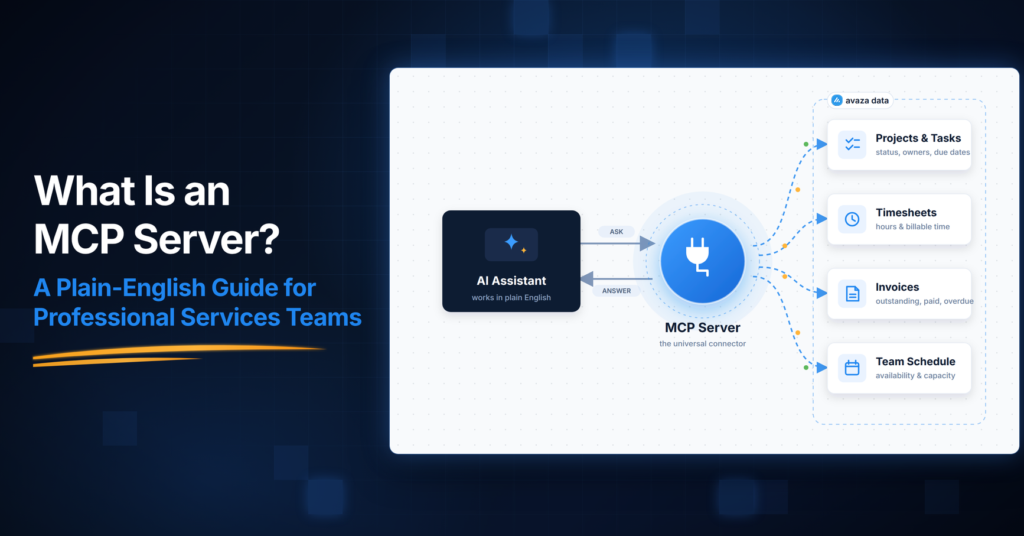
An MCP server is a piece of software that gives an AI assistant, such as Claude or ChatGPT, controlled access to another system’s data and actions. MCP, short for Model Context Protocol, is the open standard that defines how that connection works, so any compatible AI tool can connect to any system that offers one.
▶️ Here is MCP in one line. An MCP server is the controlled doorway through which an AI assistant reaches a business system. It decides what the assistant can see and do there.
What MCP Actually Is (and What It Stands For)
MCP stands for Model Context Protocol. It’s an open standard, introduced by Anthropic (the company behind Claude) in late 2024, for connecting AI assistants to the systems where business data actually lives.
Two terms get conflated, and separating them makes everything clearer:
- MCP (the protocol) is the shared standard, a common language that AI tools and business systems agree to speak.
- An MCP server is one system’s implementation of that standard. Your accounting platform might offer one. Your project platform might offer one. Each server exposes that specific system to AI assistants that speak the protocol.
The standard is no longer a single vendor’s project. In December 2025, Anthropic donated MCP to the Agentic AI Foundation, a directed fund under the Linux Foundation co-founded by Anthropic, Block and OpenAI, with support from Google, Microsoft, AWS, Cloudflare and Bloomberg.
For a business owner, that governance detail matters more than it may appear.
MCP is neutral, open infrastructure, not a proprietary connector that ties you to one AI vendor. It’s why the same standard is now supported across ChatGPT, Claude, Microsoft Copilot, Gemini, Cursor and Visual Studio Code, and why, as of late 2025, more than 10,000 public MCP servers were active, spanning everything from developer tools to Fortune 500 deployments.
That breadth is exactly why you keep hearing the term.
The Plain-English Analogy of MCP Server
The most common analogy for MCP is a universal adapter, the USB-C of AI. Before USB-C, every device needed its own cable. Before MCP, every AI-to-system connection needed its own custom integration, built and maintained separately.
The analogy is useful, but for a services firm it undersells one thing.
An adapter implies the AI gets whatever is on the other side. An MCP server is more like a staffed reception desk in front of a building. A visitor (the AI assistant) doesn’t wander the corridors. They ask the desk for something specific, perhaps the status of the Meridian project or last week’s unapproved expenses, and the desk checks who’s asking, checks what that person is entitled to see, and hands over exactly that.
The building’s own rules still apply.
Hold onto that image.
The rest of this guide is really about the two questions it raises. What’s in the building, and who sets the rules at the desk?
The Problem MCP Solves
AI assistants are articulate but isolated.
Out of the box, Claude or ChatGPT knows nothing about your firm’s projects, your team’s schedules or your unbilled time. The information it would need to be genuinely useful sits inside your operational systems.
Before MCP, bridging that gap meant one of three things:
- Someone copies and pastes. They export a report, paste it into a chat, and ask their question. It works, but it’s slow, error-prone, and instantly stale.
- A developer builds a custom integration. They wire the AI to one system through that system’s API. It works, but every pairing of AI tool and system is a separate build that someone must maintain, the same integration tax firms already pay to keep ordinary systems talking to each other.
- The firm waits. Many firms simply parked the idea, reasonably concluding the plumbing cost more than the benefit.
MCP collapses that maths.
A system offers one MCP server, and any compatible AI assistant can then connect to it in a standard way. It’s not the same thing as your existing integrations between business systems, which still matter for moving data between your platforms, and it’s more than a plugin, because the same connection standard works across AI tools rather than belonging to one vendor’s app store.
How an MCP Server Works
You don’t need the engineering detail, but a four-step picture helps you evaluate vendors and reassure security-minded colleagues.
When someone at your firm asks an AI assistant an operational question:
- The AI assistant (the “host”), whether Claude, ChatGPT or similar, recognises it needs live information it doesn’t have.
- Its built-in MCP client sends a structured request to the relevant MCP server. This is not a vague query but a specific, defined operation.
- The MCP server receives the request, checks it against the connected user’s permissions, performs the operation against the underlying system, and returns a structured result.
- The assistant turns that result into a useful answer, such as a summary, a comparison, or a draft.

Under the protocol, a server can expose two kinds of capability that are worth distinguishing in plain terms. There are things the AI can read (data provided for context) and things the AI can do (defined actions, which the protocol’s own documentation notes may require explicit user consent before they run).
That read-and-do distinction is the foundation of every sensible governance conversation you’ll have about AI access, and file system, database, code-repository and calendar servers all follow the same pattern.
What This Means for a Professional-Services Firm
Here’s the part the developer-focused explainers skip. For a services business, the MCP server is not the interesting asset. The system behind it is.
An AI assistant connected to a services firm is only as useful as the operational context it can reach. Think about what a genuinely helpful answer to “how is the Meridian engagement tracking?” requires. You need to know who the customer is, what was quoted, how the project is structured, who is scheduled to it, what time has been logged, which expenses are billable, what’s been approved, and what’s been invoiced.
That chain, customer → quote → project → people → schedule → time → expenses → invoice → reporting, is the connected thread of a professional-services operation.

If that information lives in five disconnected tools, connecting AI to any one of them yields answers with four-fifths of the picture missing. An assistant that can see tasks but not rates, schedules or invoices can tell you what’s busy, not what’s profitable. This is why many firms discover a hard truth mid-AI-initiative.
The obstacle isn’t the AI, it’s fragmented operational data. Customers who consolidate describe the result in plainer words, one “main source of truth,” with “data at your fingertips.”
So the practical sequence for an operationally mature firm runs in a specific order. Connected operations come first, then open access to them (which is what MCP provides), then governance over that access, and only then AI on top. An MCP server is the access layer.
The value is the operational truth underneath it, which is the argument for running delivery, time, expenses and billing in a connected professional services automation platform rather than a patchwork.
What Can AI Actually Access? A Worked Example for Professional Services Firms
Abstract capability lists don’t help you evaluate this, so here is a concrete, live example.
Avaza, the connected work-management platform for professional-services firms, operates its own MCP Server at mcp.avaza.com/mcp. Compatible ChatGPT and Claude environments connect to it through a custom MCP connection, and there’s a step-by-step setup guide to walk you through it.
Today, the connection covers the operational spine of a services firm. That means projects, tasks, schedules, timesheets, expenses, estimates, invoices, approvals and payments.
What does that mean on an ordinary Tuesday? A delivery director at a 60-person IT consultancy can ask their AI assistant, in plain language, which projects have unapproved timesheets before the billing run.
An operations lead can pull together schedule and task information across concurrent engagements without opening five reports.
A finance lead can review billing-relevant information conversationally while preparing month-end. And beyond retrieval, authorised users can take defined actions. They can approve or reject timesheets, submit expenses for approval, and create and apply payments to invoices, each within the permissions of the person who connected.
Notice what’s absent from that description.
Nobody handed the AI the keys to the business.
Every one of those interactions operates under the connected user’s existing permissions (more on that next), and the actions are specific, bounded operations rather than open-ended control.
Today, that is what a governed MCP connection genuinely supports.
It can inspect, summarise, prepare and act within defined limits. As governed agents mature, the same connected foundation is what will let firms extend AI further, with the boundaries still in place.
How Do You Set Up an MCP Connection?
For all the new vocabulary, setting this up is closer to connecting a calendar app than to running an IT project.
At a high level there are three steps.
- Check whether a system you already use offers an MCP server. Vendors that do will publish the details openly. Avaza, for example, publishes its server address (mcp.avaza.com/mcp), and MCP access is included across its paid plans.
- Connect your AI assistant through a custom MCP connection. Compatible ChatGPT and Claude environments both support this, and Avaza’s step-by-step setup guide walks through the process. There’s also an AI support category for the questions that come up afterwards.
- Scope the permissions before anyone connects. Decide who is allowed to connect an AI tool, and to which parts of the system, using the platform’s governance controls. In Avaza that means API Permissions, which we cover in the security section below.
The third step is the one busy firms are tempted to skip, and it’s the one that matters most. A connection made carelessly still respects the connecting user’s permissions, but a connection made deliberately reflects a decision about what AI should touch, which is a much stronger position to explain to a security-conscious client.
What Can You Ask Once AI Is Connected?
The fastest way to make this concrete is to look at the kinds of questions a services team can ask an AI assistant connected through Avaza’s MCP Server today.
Retrieval questions are the everyday workhorses.
Think of asking for the current status of a client project, which timesheets are still missing or unapproved for last week, which expenses are waiting on approval ahead of month-end, who is scheduled to an engagement next week, what an outstanding invoice position looks like for a given client, or what was included in the estimate a firm sent out last quarter.
Every one of those maps to the coverage list above, and the assistant answers from live operational data rather than from a stale export.
Then there are the action requests.
An authorised approver can ask the assistant to approve or reject the timesheets they’ve reviewed, team members can submit expenses for approval, and payments can be created and applied to invoices conversationally.
Actions stay within the connecting user’s permissions, exactly as retrieval does, so an assistant working for a project coordinator can do no more than that coordinator could do themselves.
A sensible way to start is retrieval first.
Let the team get comfortable asking questions for a few weeks, then extend to actions once your API Permissions are set the way you want them.
Today, this question-to-action loop is the genuine, shipping value of a governed MCP connection. As governed agents mature, richer workflows will build on the same foundation, and firms that started with the basics will be the ones ready for them.
Is MCP Secure?
Well, to be honest, MCP is only as secure as its implementation. The protocol alone doesn’t guarantee anything. Independent security analyses of MCP consistently reach the same conclusion and flag the same risk classes, namely prompt injection (manipulated content steering an assistant toward unintended requests), over-permissioned connections, careless credential handling, and unvetted third-party servers of unknown quality.
If a vendor tells you MCP is simply “secure,” treat that as a red flag. If they tell you what controls surround their server, keep listening.
For a professional-services firm, whose systems hold client-billable data, the evaluation comes down to three questions.
Who Is the AI Acting As?
A well-built MCP server ties every connection to a real, identifiable user. Avaza’s MCP Server, for example, authenticates connections with OAuth, the same authorise-without-sharing-your-password standard behind “Sign in with Google”, and every connection operates under the permissions of the Avaza user who authorised it.
An AI connection cannot exceed what that person could already see and do. If your project coordinator can’t view invoices, neither can their AI assistant.
What Is the AI Allowed to Do?
Identity is the floor. Scoping is the ceiling. This is where a dedicated governance layer earns its keep.
Avaza’s API Permissions, which govern MCP connections along with personal access tokens and connected apps, let administrators control read, create, update and delete access module by module across 11 modules, apply stricter overrides to individual users, block API access entirely for a specific user, and set a cap on API deletions per user per hour. That last one ships switched off, so it’s a control to enable deliberately: once an admin configures it, it contains the damage a runaway script or misfiring automation could do.
Crucially, these permissions only ever restrict.
They can never grant an AI connection rights beyond the user’s existing role.
That is “least privilege”, the security principle of granting the minimum access a job requires, applied to AI. Give agents enough access to remove work, not enough access to create chaos.
Where Do Humans Stay in the Loop?
Avaza’s approval workflows govern the underlying business records. Firms can enable timesheet and expense approvals and make them mandatory for those submissions. They are a control on the records themselves, not a review queue for AI activity, so an action taken through MCP is not held for separate sign-off.
Firms that want human review of AI-initiated changes get it through API Permissions, i.e., restrict Create, Update and Delete access for the relevant modules, account-wide or per user, and the assistant can read those records but not change them until a person does.
On the audit side, API Permission changes are logged and exportable, and connected tools operate under identifiable user permissions.
None of this makes the general risks vanish.
Connect only servers from vendors you’d trust with an integration, and be exactly as deliberate about permissions as you would be with a new employee’s system access.
But it’s the difference between AI access as an open door and AI access as that staffed reception desk.
Do You Need an MCP Server?
You don’t buy an MCP server off a shelf. You adopt one when a system you already use offers one, or build one (with development capability) for a system that doesn’t. So the real question is whether it’s time for your firm to connect AI to operational data at all.
Here are the signs the answer is yes:
- People are already doing it, badly. Staff are pasting project exports into chat tools. The data is leaving your permission boundary anyway, and a governed connection is safer than the workaround.
- Your AI initiative has stalled on data access. Pilots produced generic outputs because the assistant couldn’t see real operational context.
- Operational questions queue behind report-builders. Leaders wait for someone to assemble utilisation, billing-readiness or project-health answers that live in the system already.
- Your operational data is consolidated and trustworthy. Connected, reliable records are the prerequisite. AI access amplifies whatever data quality you have, in both directions.
And here are the signs the answer is not yet:
- Your records disagree. If project, time and finance data live in disconnected tools that don’t reconcile, fix that first. Connecting AI to fragmented data industrialises confusion.
- Nobody owns the governance conversation. If no one can say who should be allowed to connect AI, and to what, settle that before switching anything on.
- There’s no real use case. If nobody at your firm is asking AI operational questions, you lose nothing by waiting. The standard will be more mature when you arrive.
Which Questions Should You Settle Before Connecting AI?
If the previous section says yes, the governance conversation comes next, and it’s shorter than most firms fear.
Five questions cover it, and a well-built platform has a control for each answer.
- Who may connect an AI tool at all? Not everyone needs to. In Avaza, admins can block API access entirely for a specific user, so the answer can be a defined group rather than a default yes.
- Which parts of the system should be readable, and which actionable? Module-level control over read, create, update and delete access lets a firm open project and schedule data widely while keeping financial actions narrow.
- Who needs stricter limits than their colleagues? Per-user overrides mean a contractor or a junior hire can carry tighter restrictions than the standard role.
- What contains a mistake at machine speed? Admins can set a cap on API deletions per user per hour, which puts a ceiling on the damage a runaway script or misconfigured automation could do before anyone notices. It’s off by default, so turning it on is part of setup, not something to assume.
- Where do you want human review? If a change should always pass through a person, restrict Create, Update and Delete access for those modules through API Permissions, account-wide or for specific users. Timesheet and expense approvals continue to govern those records as normal business workflow, and changes to the permission settings themselves can be reviewed and exported for oversight.
Settle these five before the first connection and the rest of your AI conversation becomes much easier, because “what if the AI does something it shouldn’t?” already has a documented answer.
What Does MCP Access Cost?
The protocol itself is an open standard, so there’s no licence fee for MCP, in the same way there’s no licence fee for HTTPS. The costs sit elsewhere, and they’re worth modelling before they surprise you. There are the AI assistant subscriptions your team already pays for, and then there’s the one that catches firms out, which is how each vendor prices MCP access to its own system.
Practices differ sharply.
Some vendors treat AI connectivity as a premium enterprise feature.
In one real evaluation, a services firm found a competing vendor’s required MCP and connector access priced roughly US$10,000 per year higher, enough to reopen the firm’s platform evaluation entirely. It chose to look again at Avaza, where MCP access is included across Avaza’s paid plans rather than gated behind a top tier.
The broader lesson for budget-holders is that AI introduces a new and frequently under-modelled operating-cost layer, spanning access tiers, connector fees and usage, whether you buy or build.
When you evaluate any platform’s AI story, ask which plan MCP access actually sits on. (The build-versus-buy economics of this deserve their own article, and we have one planned on exactly that.)
MCP vs API Difference
An API is a system’s general-purpose interface for software. It is powerful, flexible, and built for developers writing code.
An MCP server is a narrower, standardised layer, typically built on top of a system’s API, purpose-designed so AI assistants can discover and use a system’s capabilities safely without custom development for every pairing.
The two coexist.
Your integrations keep running on APIs and webhooks, while MCP is the AI-facing doorway.

Frequently Asked Questions
Which AI Assistants Can Connect to an MCP Server?
MCP is supported across the major AI assistants, including Anthropic’s Claude and OpenAI’s ChatGPT, as well as tools like Microsoft Copilot, Gemini, Cursor and Visual Studio Code. Because MCP is an open standard governed under the Linux Foundation, the same server can serve different assistants, so your firm isn’t locked into one AI vendor’s ecosystem to use it.
Do We Need Developers to Use an MCP Server?
You don’t need developers to use one. Connecting an AI assistant to an existing MCP server, such as a platform vendor’s own, is a configuration task guided by setup instructions rather than a development project. You’d only need engineering capability if you wanted to build a custom MCP server for an internal system that doesn’t offer one.
Can an AI Assistant Delete or Change Our Data Through MCP?
It can act only within the permissions of the user who authorised the connection, and only through the specific operations the server exposes. Well-governed platforms add administrative scoping on top of that. In Avaza, for example, admins can restrict create, update and delete access per module and per user, and set a cap on API deletions per user per hour as a containment measure (it’s off until an admin enables it).
Does MCP Mean the AI Runs Our Business Autonomously?
No, it doesn’t. Today, an MCP connection lets an assistant retrieve information and perform specific, bounded actions under a real user’s permissions. It can inspect, summarise, prepare and act within defined limits, and firms that want human review of changes can restrict Create, Update and Delete access through API Permissions. Fully autonomous agents running commercial decisions are a future direction the industry discusses, not what current governed connections do.
Is an MCP Server a Product We Buy?
Generally, no, it is not. An MCP server is a capability a software vendor provides for its own system, or something a technical team builds for an internal one. When evaluating software, treat it as a feature question. Does this platform offer MCP access, on which plans, and with what governance controls? It is not a separate purchase.
The Takeaway
An MCP server is the controlled doorway between AI assistants and your business systems, and its usefulness is decided by what’s behind the door. A firm whose projects, people, schedules, time, expenses and billing live in one connected, governed platform gives any AI assistant something worth connecting to.
Avaza is that connected foundation for professional-services teams, with a live MCP Server, OAuth-authenticated connections, and administrative permission controls built in, included across paid plans.
Explore the Avaza MCP Server, or start a free Avaza account and see the connected platform your future AI workflows would sit on.