
Workload Management: How to Balance Teams & Hit Deadlines Without Burnout
💡 Projects don’t fail because people don’t work hard, they fail because capacity, timelines, and budgets live in different places.
Handoffs get fuzzy, specialists get double-booked, and every Thursday feels like triage.
Resource planning fixes that by connecting who you have, what they can do, and when the work is due.
👉 With Avaza, that connection becomes a living, visual plan you can adjust in seconds. You see role and person availability on one schedule (with leave & public holidays baked in), drag-and-drop assignments to cool red heatmap weeks, and use Team View / Project View to shift smoothly from portfolio strategy to individual focus.
Placeholders let you reserve capacity for pipeline demand and convert to named people as dates firm up, so planning keeps moving even when staffing details lag.
The payoff is operational and financial:
- Spot risks early: red/blue capacity signals surface overload and slack before deadlines slip.
- Protect deep work: reserve contiguous focus blocks to cut context switching.
- Stay honest on utilization: planned vs. actuals reconcile automatically through timesheets.
- Close the loop: approved time and expenses flow straight into invoices—less admin, faster cash.
▶️ In short: One source of truth for people, projects, and profitability. Instead of reacting to surprises, you’re making calm, data-driven trade-offs—rebalancing work in minutes and turning delivery into repeatable wins.
For Project/Ops/Resource Leads
- Goal: Even distribution of effort across people and weeks to protect delivery dates and margins.
- Why teams slip: Invisible capacity, shifting scope, siloed tools, last-minute handoffs.
- What to do now: Centralize demand vs. capacity, time-box priority work, use team-level and project-level views, and re-balance with availability filters—weekly.
- Avaza fit: Drag-and-drop Resource Scheduler, real-time availability & utilization metrics, timesheets, expenses, invoicing, client collaboration – all in one.
What Is Workload Management In Project Delivery?
Workload management is the ongoing process of scoping work, estimating effort, assigning the right people, tracking actuals, and continuously rebalancing as reality changes.
It blends resource scheduling, capacity planning, and execution visibility (tasks, time, and progress). In professional services, it’s essential to keep utilization healthy while preventing burnout and missed deadlines.
Turning Chaos to Clarity: Five Root Causes of Team Overload
Across high-velocity delivery orgs, missed dates rarely come from “slow people.” They come from an operating model gap – fragmented demand, opaque capacity, and weak feedback loops. When demand, capacity, and actuals don’t live together, you’re not managing workload, you’re negotiating chaos.
Here’s what’s really happening, how it shows up, and the clean fix with Avaza.
1) Hidden demand (the invisible pipeline)
Work sneaks in through email, Slack, hallway asks, and client pings. Each request looks harmless; together they cannibalize planned capacity.
- Operational signals: 10–20% of the week disappears into “quick favors”; mid-sprint velocity dips; delivery dates slip even when boards look green.
- Risks: Undocumented scope, silent WIP creep, PMs losing forecast credibility.
👉 Avaza fix: Funnel ad-hoc asks into Tasks with estimated hours so they immediately roll into the Resource Scheduler and the capacity heatmap.
2) Unclear estimates (tasks without effort)
Backlogs say what to do, not how much it costs in hours by role and week. Plans become task-shaped, not time-shaped.
- Operational signals: Rework increases; PMs can’t defend role-by-week forecasts; utilization targets become guesses.
- Risks: Margin erosion from under-estimation; context switching to plug gaps.
👉 Avaza fix: Capture effort at task/phase; Avaza auto-aggregates into capacity and utilization views so staffing is defensible.
3) Siloed tooling (no single source of truth)
Tasks, scheduling, time, and billing live in different apps and spreadsheets, so there’s no closed loop plan → actuals → replan.
- Operational signals: Friday reconciliation rituals; conflicting statuses; stale dashboards.
- Risks: Late risk detection; quote-to-invoice drift; leadership blind spots.
👉 Avaza fix: Run Tasks, Resource Scheduling, Timesheets, Expenses, Invoicing, and Client collaboration in one platform for real-time rebalancing—no exports.
4) Priority whiplash (unbuffered change)
Rush jobs arrive without a fast-lane policy or WIP limits. “Everything is P0” becomes the culture.
- Operational signals: Frequent preemption; weekend work; morale dips in key roles.
- Risks: SLA breaches, quality regressions, burnout.
👉 Avaza fix: Reserve a 10–15% fast lane; tag rush work and slide non-critical bookings in Timeline so trade-offs are explicit and visible.
5) No guardrails (accidental over-allocation)
Without soft vs. hard bookings, utilization targets, and leave calendars, the same specialists sit at 110%+ while others idle.
- Operational signals: The same “top five” are always on fire; uneven utilization across roles.
- Risks: Attrition, single-point-of-failure risk, delivery volatility.
👉 Avaza fix: Enforce 80–85% utilization; capacity automatically respects leave/holidays; use soft bookings for tentative holds until scope is firm.
Bottom line: Make demand, capacity, and actuals coexist—and overload drops. Avaza is built to make that coexistence effortless.
From Plan to Profit: How Avaza Turns Workload Management into a Living Forecast
Avaza is a closed-loop system for planning, execution, and financials. That means your schedule isn’t a static guess “it’s a living forecast tied to real capacity, actuals, and revenue”.
For fast-growing agencies, consultancies, IT, and creative teams, this is how you keep projects on track without burning people out.
Visual Resource Scheduling (drag, drop, done)
Staffing happens on a single, live timeline. You can assign by hours/day or total booking, stretch or shrink allocations as scope firms, and reallocate with a quick drag, no exports or side spreadsheets.
Switching between Team View and Project View lets you resolve conflicts in seconds, while guardrails automatically respect PTO/holidays and partial availability so accidental overbooking doesn’t sneak in.
Impact: Rebalancing becomes a quick ritual during stand-ups and mid-week pulses; after-hours scrambles decline.
Micro-example: A designer trending at 105% next week? Push a non-urgent asset to the following week and split 6 hours to a backup designer—done in one place, instantly reflected in capacity.
Availability filters (the right fit, fast)
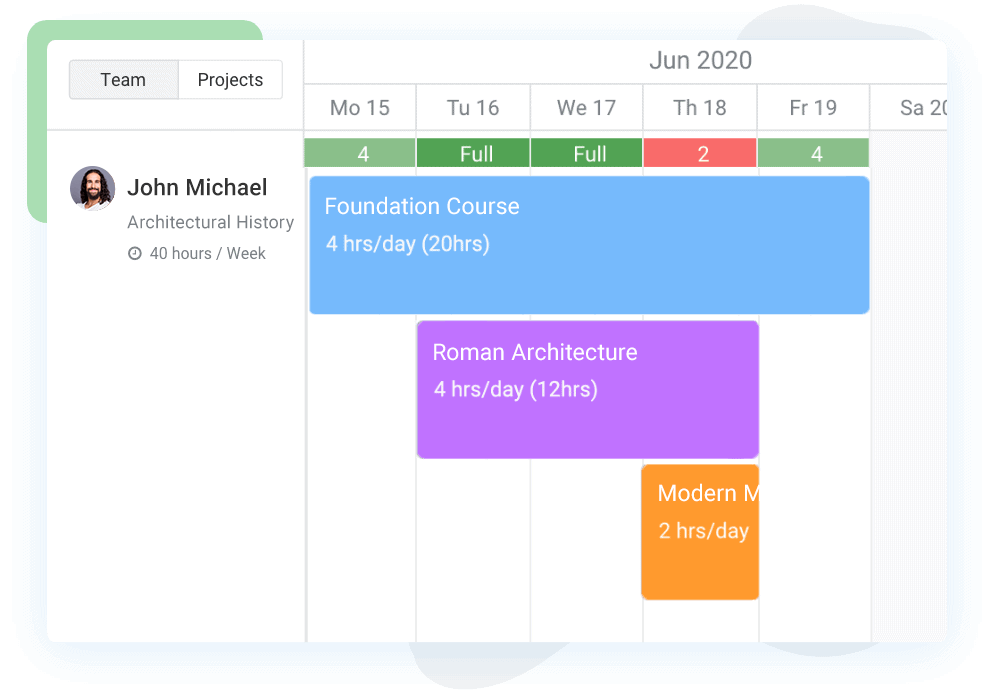
Avaza helps you staff with people who are both qualified and actually available. Filters by role, skills, time zone, availability window, and remaining capacity surface the best option for the current week is vital for cross-studio resourcing, contractor backfills, and multi-timezone coverage.
The practical outcome is fewer “assign now, fix later” moments that turn into weekend work. If your role/skill taxonomy isn’t standardized yet, normalize it once and the filters become a force multiplier.
Utilization & capacity reporting (real-time guardrails)

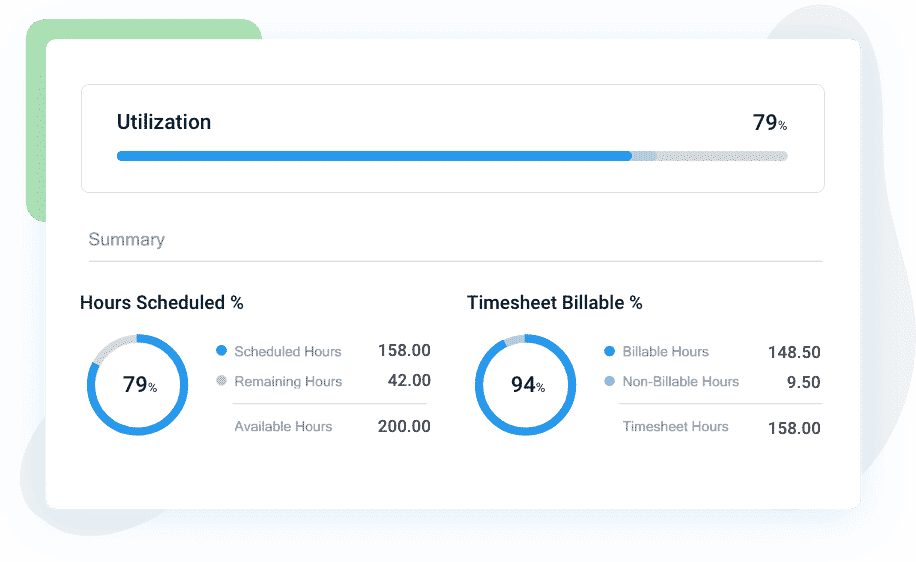
You see where the team is redlining before it turns into overtime. Utilization by person/role, capacity trends, and over-allocation hot spots are available without exports; the data already accounts for leave, part-time settings, public holidays, and soft vs. hard bookings.
That gives you early risk detection to protect margin and morale, and clear evidence when you need to make trade-off calls with account leads or clients.
A useful habit here is to track distribution, not just averages; an 85% team average can hide three people working at 115%, and Avaza makes that visible.
Tasks, time, expenses & invoicing in one loop
With Tasks → Timesheets → Expenses → Invoicing connected to scheduling, you close the loop from quote → deliver → bill.
Actuals flow back into the plan automatically, which reduces write-offs and speeds month-end close. When a task runs long, Avaza updates effort actuals and your next estimate template learns from it, no manual reconciliation required.
Stack fit that matches how you work
Avaza integrates with the systems you already rely on “QuickBooks and Xero for finance, Jira and Zendesk for delivery/support, and more”. Finance, engineering, and support stay aligned on the same, current data, so you cut spreadsheet hand-offs and version-control headaches while keeping one source of truth.
Quick implementation (this month, not this year)
- Centralize projects, retainers, BAU, and people in Avaza and estimate hours by role/week to build a 6–8 week forward view.
- Set 80–85% utilization with hard limits on peak weeks.
- Run a weekly resource stand-up with a five-minute mid-week pulse, then lock next week to stop churn.
- Reserve a 10–15% fast lane and make trade-offs explicit when you use it.
- Review planned vs. actuals every Friday, update templates, connect time → expenses → invoicing, and keep availability filters plus leave/holiday calendars on so capacity remains honest.
▶️ Bottom line: if you’re serious about team workload management, you need planning, execution, and finances in one loop. Avaza closes that loop, turning scheduling into a living forecast you can trust.
Try Avaza For Free
If you feel that Avaza might be the right workload management software for your team, sign up to start using Avaza for free. If you need any help with your Avaza subscription or want to better understand our pricing, please contact chat support or email support@avaza.com.
The Workload Management Framework (Optimized For Real Delivery Pressure)
High-velocity teams don’t need more meetings; they need a repeatable operating loop where demand, capacity, and actuals stay in sync.
This framework scales from a 10-person studio to a 300-person practice and follows a simple progression: one source of truth → predictable cadence → protective guardrails → explicit fast lane → continuous calibration.
Avaza connects each part so your schedule becomes a living forecast—not a static plan.
Step 1: Create a single source of truth (demand → capacity → actuals)
The foundation is visibility. If you can’t see all incoming work (demand), all human hours (capacity), and what really happened (actuals), you will always be reacting.
How it looks in practice:
Start by consolidating every project, retainer, change request, and BAU task in one place.
Standardize your people data “employees and contractors” with roles, skills, locations, and time zones.
Capture hours at the task/phase level and tie each task to a role and a target week. Roll it all up into a capacity heatmap and preload public holidays/leave so the picture is honest on day one.
👉 Avaza move: Add estimated hours to Project Tasks with role/skill tags; the Resource Scheduler turns that into a real-time heatmap where PTO/holidays auto-adjust capacity. Keep Tasks, Time, Expenses, and Invoicing connected so plan → actuals stays in one loop.
Avoid: “Assigned to Alex” as a proxy for staffing; project-level estimates without weekly rollups; story points with no stable SP→hours conversion.
💡 Example (creative agency): “Campaign B” adds 18 ad-hoc design hours. Converting Slack asks to Avaza Tasks with effort makes them appear instantly on the Scheduler. Your next two weeks now show that designer at 95%, not the misleading 75% you thought you had.
Watch-out: Normalize roles (e.g., “Designer” vs “Senior Designer”). If you don’t, the heatmap lies and staffing becomes guesswork.
Step 2: Adopt a cadence that prevents churn (not micromanagement)
Cadence makes the plan durable. You’re aiming for lightweight rituals that keep the forecast honest without micromanaging.
The rhythm that works:
Run a weekly resource stand-up (15–20 minutes) to review hot spots, rebalance, and lock next week. Add a mid-week pulse (5 minutes) to triage changes, track fast-lane usage, and confirm trade-offs.
This treats the schedule like a forecast to refine, not a diary to regret—and it moves trade-offs earlier, before they become Friday-night emergencies.
👉 Avaza move: Drag-and-drop to resize or reassign in seconds; use availability filters (role, skills, location, remaining capacity) to staff this week with confidence; toggle Team View (people-first) and Project View (project-first) to resolve conflicts quickly.
💡 Example (consultancy): A client escalates a P1 dependency on Wednesday. In Avaza you pull forward 12 hours from an under-running analytics task and push low-priority work one week—rebalance done in a single view.
Watch-out: Porous locks. If “just one more change” sneaks in after Friday, cadence dissolves. Protect the lock and push non-urgent requests to the next planning slot.
Step 3: Add guardrails to stop over-allocating go-to people
Guardrails protect people and predictability. They replace heroics with truth about capacity.
What the guardrails are:
Aim for 80–85% utilization to leave space for deep work, documentation, and recovery. Enforce hard limits during training/launch weeks. Rotate backup/pairing on critical roles so no single person becomes a point of failure.
👉 Avaza move: Monitor utilization dashboards by person/role; capacity respects leave/holidays/partial availability automatically; hold tentative work as soft bookings, convert to hard when scope firms up.
💡 Example (IT team): Your top FE dev sits at 110% two weeks running. Avaza flags it; you move 10 hours to a cross-trained FE dev and convert 6 hours to soft pending design sign-off.
Watch-out: Averages hide pain. A team average of 85% can mask three specialists at 115%. Always scan the distribution.
Step 4: Handle urgent, unplanned work without breaking the plan
Unplanned work is inevitable; chaos is optional. A defined fast lane gives you speed without wrecking delivery.
How the fast lane works:
Reserve 10–15% capacity for P0/P1 items. When you use it, de-scope or defer something explicitly—don’t stealth-push planned work. Publish the trade-offs so deep-work windows remain protected.
👉 Avaza move: Tag rush tasks; slide lower-priority bookings on the Timeline with stakeholder visibility; snapshot before/after to show impact—no side spreadsheets
💡 Example (creative studio): Same-day social set request arrives. You consume 8% of fast-lane capacity, push a non-critical internal asset by three days in Avaza, and notify the PM and account lead directly from the Timeline.
Watch-out: Fast-lane creep (“everything is urgent”). Cap usage and require a short justification per fast-lane ticket.
Step 5: Close the loop to improve estimates (continuous calibration)
If you don’t calibrate, you calcify. Planned vs. actuals is the learning engine that hardens your forecast and protects margin.
The feedback routine:
Each Friday, compare planned vs. actuals by role and work type. Classify variance—under-scope, dependency wait, rework, client churn—and update baselines, checklists, and templates. Fix the template, not just this week’s plan.
👉 Avaza move: Use Timesheets vs. Planned Hours to spot drift; clone schedules that hit dates and margins, then fine-tune for the next engagement.
💡 Example (consultancy): Backend API tasks run 18% over for one client. You add a client-specific multiplier and a dependency checklist for auth providers. The next sprint lands within 3%.
Watch-out: Treat variance as a neutral signal. If people fear the number, actuals get sanded down, and your learning loop dies.
▶️ Get Started with Avaza — Free
Frequently Asked Questions
What’s the difference between team workload management and project resource planning?
Team workload management focuses on people first “who is free or overloaded across all projects” while project resource planning focuses on one project’s needs. You need both views to allocate fairly and protect cross-project deadlines. In Avaza, you can toggle team vs. project views so neither lens gets ignored.
How often should we rebalance workload?
Weekly is the sweet spot for most agencies and IT teams. It’s frequent enough to catch slippage and urgent requests, but not so frequent that plans churn. Add a mid-week pulse for big accounts or heavy change.
How do we protect utilization without burning people out?
Set realistic targets (80–85%), include leave/learning time, and enforce hard limits during peak weeks. Use real-time reports to spot early over-allocation and shift work before it becomes overtime.
Can workload management work with retainers and projects?
Yes. Retainers provide predictable base load; projects add variability. Use soft bookings to tentatively hold future weeks and convert to hard bookings once scopes are confirmed.
What should we track to prove it’s working?
Track: on-time delivery, utilization by role, over-allocation incidents, variance (planned vs. actual hours), and margin by project/client. Review monthly and refine templates.
Final Thoughts
Workload management isn’t a ceremony “it’s an operating system for predictable delivery”.
When demand, capacity, and actuals live in one loop, you replace guesswork with a living forecast, spread work fairly across roles and weeks, and protect both deadlines and people. The teams that win don’t work harder; they see earlier, decide faster, and recalibrate weekly.
▶️ With Avaza, that loop is built in. The visual Resource Scheduler gives you real capacity (PTO, partial availability, and soft vs. hard bookings included). Availability filters surface the right skills at the right time. Utilization and capacity reporting reveal risks before they become overtime. And the financial loop—Tasks → Timesheets → Expenses → Invoicing—turns delivery into clean revenue without reconciliation marathons.
If you’re a fast-growing agency, consultancy, IT project team, or creative studio, the playbook is the same:
- Centralize work and people, estimate in hours at the task/phase level, and plan 6–8 weeks ahead.
- Run a lightweight weekly cadence, lock next week, and keep a small fast lane for true P0s.
- Compare planned vs. actuals every Friday and let those lessons update next week’s plan.
Do this in Avaza and your schedule stops being a static plan, it becomes a trustworthy forecast that keeps teams balanced, clients happy, and margins healthy.