
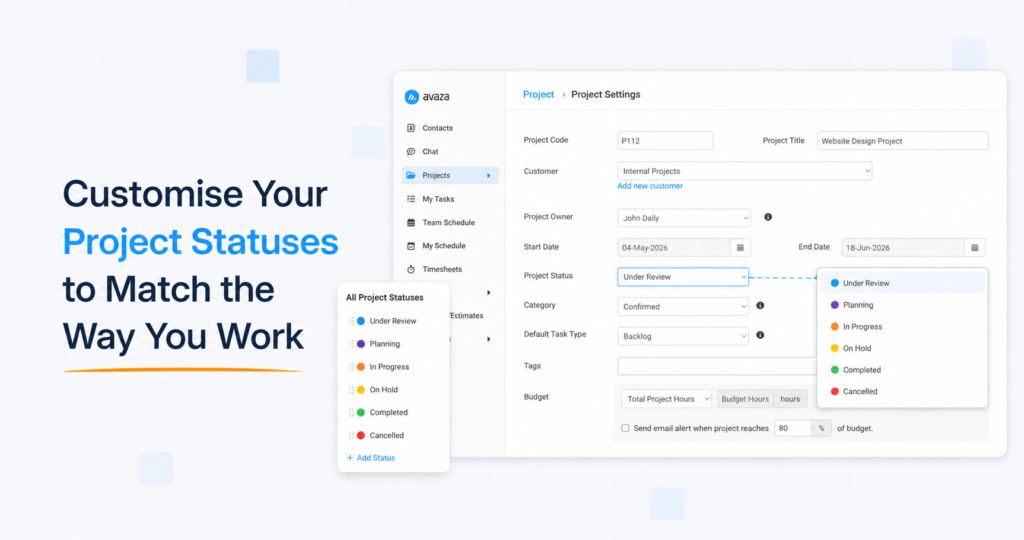
Project Statuses are now fully configurable per account. Account Admins can add, edit, reorder, and delete project statuses, choose a color for each, and tailor the list to match your team’s exact workflow.
Head to Settings → Project Management and you’ll find a new Project Statuses panel — sitting right alongside the Project Categories panel you may already be using.
Add custom statuses. Click Add Status, give it a Name, a Code (used by integrations and the API), and a Color. Save. It’s immediately available everywhere project status appears — the Project Edit page, the Project List, APIs, and reports.

Edit existing statuses. Click any status to rename it, change its color, or update its role in your workflow. The four standard statuses you have today are fully editable too — feel free to rename In Progress to In Production if that’s the language your team speaks.

Reorder statuses. Drag and drop to set the order they appear in dropdowns and lists.
Delete statuses you don’t use. If a status is currently in use by some projects, Avaza will ask you to pick a replacement and reassign those projects in one step before the delete completes. No orphaned projects, no manual cleanup.
Every Avaza account needs to know two things about its projects: which status means the work hasn’t started yet and which means the work is done. We’ve built that into the new system with two flags:
- Default for new projects — the status assigned automatically whenever a new project is created. Exactly one status holds this flag at any time.
- Marks project as complete — the status that tells Avaza a project is finished. Used for filtering, reporting, and for any downstream behaviour that cares whether a project is closed out. Exactly one status holds this flag too.

You can promote any status you like to either role from the Edit Status dialog. To keep the system reliable, every account must have at least two statuses, with one of each flag set.